
The AI agent vs chatbot debate is no longer academic — it is a business decision with direct operational consequences. According to a 2025 Gartner report, over 70% of business chatbot deployments fail to resolve customer queries without human handoff, yet businesses continue investing in them as if they were AI agents. They are not. An AI agent vs chatbot is not a matter of degree — it is a matter of architecture, capability, and what the technology can actually do autonomously. This guide explains the distinction clearly, with real business examples, and gives you a decision framework for choosing the right tool.
Affiliate Disclosure: Some links in this article are affiliate links. If you purchase through them, AutoPilotWork AI earns a commission at no extra cost to you. We only recommend tools we have personally tested.
⚡ TL;DR — AI Agent vs Chatbot at a Glance
- A chatbot answers questions. An AI agent completes goals. That is the core distinction.
- Chatbots are reactive and single-step — they respond to a prompt and stop. AI agents are autonomous and multi-step — they plan, act, and self-correct.
- AI agents use tools — APIs, search engines, code execution, file systems — that chatbots cannot access.
- Choose a chatbot for FAQ handling, lead capture, and scripted support flows under $50/month.
- Choose an AI agent when the task requires multiple actions, external data, or autonomous decision-making across a full workflow.
What Is a Chatbot? Definition, Types and Business Use Cases in the AI Agent vs Chatbot Debate
A chatbot is a software application designed to simulate conversation with users — typically through a text interface on a website, app, or messaging platform. In the AI agent vs chatbot comparison, the term “chatbot” covers a wide range of implementations, from basic rule-based scripts to sophisticated large language model (LLM) powered assistants. What all chatbots share is a fundamental operating model: a user sends a message, the chatbot processes it, and a response is returned. The exchange is complete.
There are two main types of chatbots deployed in business contexts in 2026:
Rule-based chatbots
Rule-based chatbots operate on decision trees and keyword matching. They are programmed with a finite set of responses to anticipated inputs. If a user asks “What are your opening hours?” and that phrase matches a rule, the bot returns the stored answer. If the input does not match any rule, the bot fails — typically with “I didn’t understand that” or an immediate handoff to a human agent. Rule-based chatbots are cheap, fast to deploy, and completely predictable. They are also brittle: any query outside their programmed scope breaks the experience.
LLM-powered chatbots
LLM-powered chatbots use large language models (such as GPT-4 or Claude) to generate responses dynamically rather than from a fixed script. They handle a much wider range of inputs, maintain conversational context within a session, and produce more natural responses. Tools like Intercom’s Fin, Tidio’s Lyro, and standard ChatGPT fall into this category. These are significantly more capable than rule-based bots — but they are still, fundamentally, reactive systems. They respond to what you send them. They do not initiate actions, use external tools, or execute multi-step processes without a human in the loop at each stage.
When a chatbot is the right choice
Chatbots remain the right tool for a specific set of business use cases: customer support FAQs, lead qualification flows, appointment booking via scripted logic, simple onboarding sequences, and first-response triage before human handoff. For these use cases, a chatbot is faster to deploy, cheaper to run, and easier to manage than an AI agent. The mistake is not using chatbots — it is using them for tasks that require the capabilities of an AI agent.
What Is an AI Agent? Definition, Capabilities and Business Use Cases
An AI agent is a system that uses a large language model as its reasoning engine but extends far beyond conversation. The defining characteristic of an AI agent vs chatbot is autonomous, multi-step task execution. You give an AI agent a goal — not a prompt — and it plans the steps required to achieve that goal, executes each step using available tools, monitors the results, and adjusts its approach based on what it encounters. The process continues until the goal is reached or the agent determines it cannot proceed without human input.
According to Anthropic’s research on building effective agents, the key capability that distinguishes agents from chatbots is the ability to use tools — external systems like web search, APIs, code execution environments, file systems, and databases — to act on the world rather than just describe it.
Core capabilities of AI agents
What makes the AI agent vs chatbot comparison meaningful in practice is the tool-use capability. An AI agent can search the web for current information, write and execute code to process data, read and write files, call external APIs (CRM, email, calendar, payment systems), and pass results between these tools across a multi-step workflow — all within a single task run. A chatbot cannot do any of these things natively. It can describe how to do them. It cannot do them.
Memory is the second critical differentiator. Most chatbots operate within a single session — once the conversation ends, all context is lost. AI agents can maintain persistent memory across sessions, meaning they remember previous interactions, learn preferences, and build context over time. For business workflows — where a client history, project context, or operational state matters — this distinction is operationally significant.
Real business examples of AI agents in action
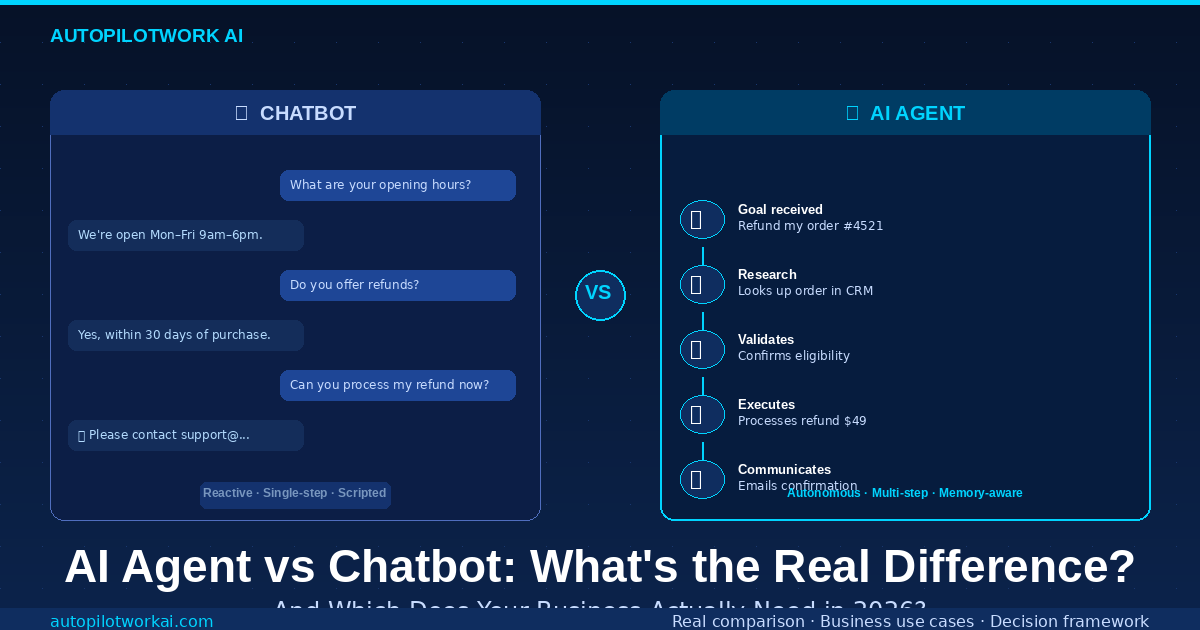
A concrete example of the AI agent vs chatbot difference clarifies the distinction better than any definition. A user asks: “Process a refund for order #4521.” A chatbot responds with instructions for how to request a refund. An AI agent looks up order #4521 in the CRM, verifies the purchase date and refund eligibility, processes the refund via the payment API, updates the order status in the database, and sends a confirmation email — without any further human input. The AI agent completed a five-step workflow. The chatbot described one. For more practical examples of agents in operation, see our guide to the best AI agents for content creators in 2026.
AI Agent vs Chatbot: The Key Differences Explained
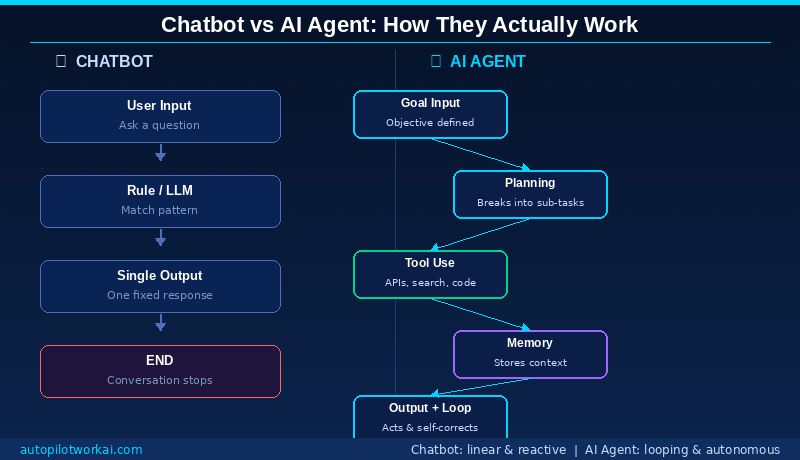
The AI agent vs chatbot distinction comes down to five fundamental architectural differences. Understanding these is what allows you to make the right tool choice for a given business problem.
- Reactive vs Proactive: A chatbot waits for user input and responds. An AI agent can initiate actions based on triggers, schedules, or conditions — without waiting to be asked. It can monitor a data source, detect a change, and act on it autonomously.
- Single-step vs Multi-step: Every chatbot interaction is a single exchange: input in, output out. An AI agent executes a sequence of steps toward a goal, with each step informing the next. A single agent run can involve 10, 20, or 50 individual actions.
- No memory vs Persistent memory: Chatbots lose context when a session ends. AI agents maintain memory across sessions — they know what they worked on last time, what was decided, and what remains incomplete.
- No tools vs Full tool access: Chatbots generate text. AI agents use tools — web search, code execution, API calls, file read/write — to act on external systems. This is the capability gap that makes agents genuinely autonomous rather than conversationally sophisticated.
- Script-following vs Goal-directed: Chatbots follow pre-defined conversational scripts or generate contextually appropriate responses. AI agents pursue goals — they determine the steps required, execute them in sequence, handle errors when they occur, and report outcomes when complete.
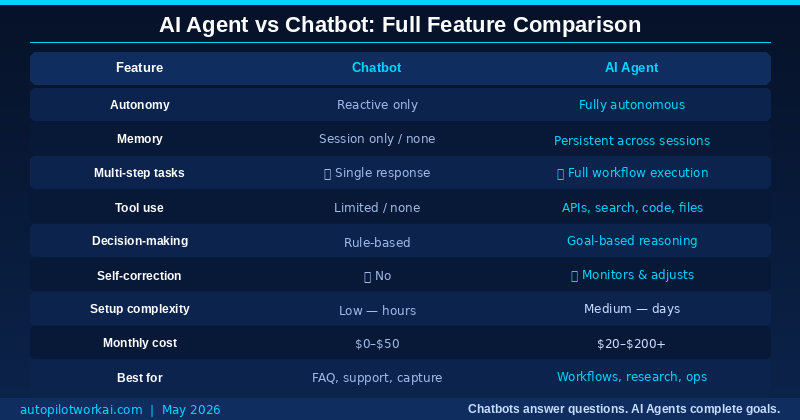
AI Agent vs Chatbot: Full Feature Comparison Table
| Feature | Chatbot | AI Agent |
|---|---|---|
| Autonomy | Reactive only | Fully autonomous |
| Memory | Session only / none | Persistent across sessions |
| Multi-step tasks | ❌ Single response only | ✅ Full workflow execution |
| Tool use | Limited / none | APIs, search, code, files |
| Decision-making | Rule-based | Goal-based reasoning |
| Self-correction | ❌ No | ✅ Monitors and adjusts |
| Setup complexity | Low — hours | Medium — days |
| Monthly cost | $0–$50 | $20–$200+ |
| Best for | FAQ, support, lead capture | Workflows, research, ops |
AI Agent vs Chatbot: 5 Real Business Scenarios
Abstract definitions only go so far. Here is how the AI agent vs chatbot distinction plays out across five scenarios that represent typical small business and agency operations.
Scenario 1: Customer support for an e-commerce store
Winner: Chatbot. If your support volume is dominated by order status queries, return policy questions, and shipping timelines, a well-configured LLM chatbot handles 60–80% of these without human involvement. The queries are predictable, the answers are finite, and the cost-to-value ratio is excellent. An AI agent would be over-engineered for this use case.
Scenario 2: Content production pipeline for a blog or agency
Winner: AI Agent. A chatbot can help you draft a paragraph. An AI agent takes a keyword, researches the SERP, writes a full article, formats it as WordPress HTML, and triggers a publish workflow — autonomously. The difference in output volume and time saved is not incremental. It is structural. See how this works in practice in our guide to AI agents for content creators.
Scenario 3: Lead qualification and CRM update
Winner: AI Agent. A chatbot can collect a lead’s name and email. An AI agent qualifies the lead based on their responses, scores them against your ICP criteria, creates a CRM record, assigns them to the correct sales sequence, sends a personalized first email, and notifies the sales rep via Slack — in a single workflow run. This is the difference between data collection and pipeline automation.
Scenario 4: Internal FAQ for a small team
Winner: Chatbot. If the use case is answering employee questions about company policies, HR procedures, or tool documentation, a chatbot trained on your internal knowledge base is sufficient. The queries are bounded, the answers are stable, and setup takes hours rather than days. A simpler solution fits a simpler problem.
Scenario 5: Email inbox management and response drafting
Winner: AI Agent. Managing email at volume — reading, categorizing, drafting responses, following up on outstanding threads, and escalating priority items — requires a tool that can read context, make decisions, and take action across multiple steps. A chatbot cannot read your inbox. An AI agent can. For a practical implementation guide, see our tutorial on setting up an AI email agent that automates your inbox.
AI Agent vs Chatbot: When to Choose a Chatbot
The AI agent vs chatbot decision is not always in favour of agents. Chatbots are the right choice in a specific and well-defined set of circumstances. Choose a chatbot when:
- Your use case is bounded and predictable. If users will always ask one of 20–50 known questions, a chatbot handles this faster, cheaper, and more reliably than an agent.
- Speed of deployment matters more than capability depth. A basic chatbot can be live in hours using platforms like Tidio or Intercom. An AI agent workflow requires design, testing, and integration — typically measured in days.
- Your budget is under $50/month. Capable chatbot platforms start free and scale gradually. A full AI agent stack — agent platform + automation layer + LLM subscription — starts at around $55/month and scales with usage.
- The task requires no external action. If the AI only needs to provide information — not retrieve, update, or create anything in an external system — a chatbot is sufficient and simpler to maintain.
- Your team has no technical setup capacity. Chatbots require minimal configuration. AI agents, particularly custom builds on platforms like Relevance AI, require structured workflow design even with no-code tools.
AI Agent vs Chatbot: When to Choose an AI Agent
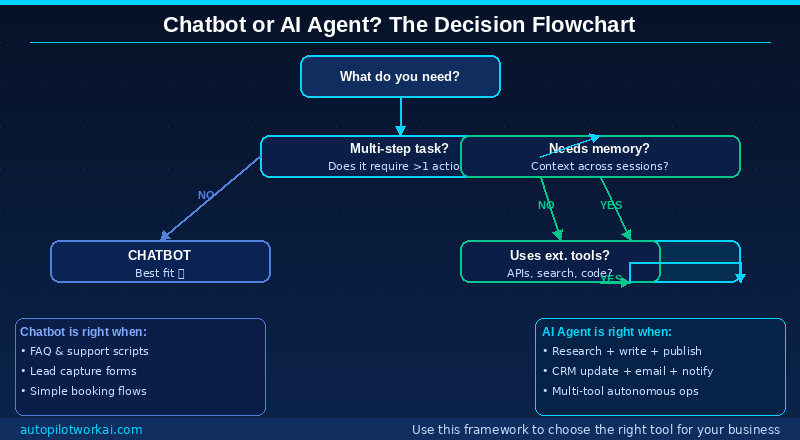
The AI agent vs chatbot comparison tilts decisively toward agents when any of the following conditions apply. Choose an AI agent when:
- The task requires more than one action. If completing the task means touching more than one system, executing more than one step, or making decisions based on retrieved data — you need an agent, not a chatbot.
- Context must persist across sessions. If the AI needs to remember previous conversations, track project state, or build knowledge about a client over time, persistent agent memory is required.
- External tools or data are involved. Any task that requires reading from or writing to an external system — CRM, email, calendar, database, file storage — requires an agent’s tool-use capability.
- You are automating a workflow, not answering a question. The distinction between workflow automation and Q&A is the clearest signal. Workflows need agents. Questions need chatbots.
- The task currently consumes significant manual time. If a member of your team spends 2+ hours per week on a repeatable process involving data retrieval, writing, and communication — that process is an AI agent candidate. For a practical starting point, our tutorial on building your first AI agent without code walks through the full setup in 30 minutes.
How to Upgrade from a Chatbot to an AI Agent Workflow
Most businesses already have at least one chatbot deployed. The AI agent vs chatbot upgrade path does not require replacing everything. The transition from chatbot to AI agent does not require replacing everything — it requires identifying which workflows have outgrown what a chatbot can deliver and building agent layers on top. Here is a practical upgrade path:
- Audit your current chatbot’s failure points. Pull the last 30 days of chatbot conversations and identify the most common handoff triggers — the moments where the bot escalated to a human. These are your agent candidates. They represent tasks the chatbot cannot complete autonomously.
- Identify the highest-value failure category. Not all handoffs are equal. Rank the failure categories by volume and by the cost of human time spent resolving them. The highest-value category is your first agent workflow.
- Map the steps required to complete that workflow. Write out exactly what a human does when they handle this task: what data they retrieve, what decisions they make, what systems they update, what communications they send. This becomes your agent’s workflow specification.
- Choose an agent platform that fits your stack. For non-developers, Copy.ai Workflows, Relevance AI, or Zapier AI Agents are the most practical starting points. For content-specific workflows, the right LLM platform matters — Claude, ChatGPT, and Gemini each have different strengths for different task types.
- Build, test, and measure. Run the agent workflow in parallel with the human process for two weeks. Compare output quality, error rate, and time saved. Adjust the workflow based on failure patterns. Only after consistent parallel success should the agent run fully autonomously.
- Keep the chatbot for what it does well. The chatbot and the AI agent are not mutually exclusive. Run the chatbot for bounded FAQ and support queries. Run the agent for the multi-step workflows that the chatbot failed at. This hybrid approach is how the most operationally efficient small businesses are structured in 2026.
Frequently Asked Questions: AI Agent vs Chatbot
AI Agent vs Chatbot: What Is the Main Difference?
The main difference in the AI agent vs chatbot comparison is autonomy and task scope. A chatbot responds to a single prompt and produces a single output — the interaction ends there. An AI agent receives a goal and executes a multi-step workflow to achieve it, using external tools like APIs, search engines, and code execution along the way. A chatbot answers questions. An AI agent completes tasks. This distinction determines which tool is appropriate for a given business problem.
Can a chatbot become an AI agent?
Not without a fundamental architecture change. Adding an LLM to a rule-based chatbot makes it more conversationally capable, but does not make it an AI agent. The defining characteristics of an AI agent — persistent memory, tool use, multi-step execution, goal-directed behaviour — require a different technical foundation. You can build an AI agent that handles some of the same conversational use cases as a chatbot, but a chatbot cannot be upgraded into an agent by changing a setting.
Is ChatGPT Closer to an AI Agent vs Chatbot?
In its standard interface, ChatGPT functions as an LLM-powered chatbot — highly capable conversationally, but reactive and single-step. With features like Code Interpreter, web search, and custom GPT configurations with tool access, it operates with agent-like capabilities. The distinction depends on how it is configured and used. A basic ChatGPT conversation is a chatbot interaction. A ChatGPT workflow that searches the web, writes code, executes it, and saves output to a file is an AI agent workflow.
How much does it cost to deploy an AI agent vs a chatbot for business?
A functional business chatbot can be deployed for $0–$50/month using platforms like Tidio’s free tier, Intercom’s Starter plan, or a basic LLM API integration. A functional AI agent stack costs $55–$120/month for a solopreneur: a capable LLM subscription ($20), an automation platform like Zapier or Make ($20–$50), and optionally a dedicated agent platform ($0–$19 on free/starter tiers). The cost differential is real but modest relative to the difference in capability.
AI Agent vs Chatbot for Customer Service: Which Is Better?
For front-line customer support handling FAQ and known queries, a well-configured chatbot is faster to deploy and cheaper to run. For support workflows that require account lookups, refund processing, or escalation logic across multiple systems, an AI agent delivers significantly better resolution rates. The practical approach for most businesses is a hybrid: a chatbot for first response and triage, with an AI agent handling complex resolution workflows in the background.
What are the best AI agent platforms for small businesses in 2026?
The strongest no-code AI agent platforms for small businesses in 2026 are Copy.ai Workflows (best for content and marketing automation), Relevance AI (best for custom workflow builds), and Zapier AI Agents (best for businesses already running on Zapier). For businesses that need a purpose-built agent for a specific task — email, content, research — purpose-specific tools often outperform general platforms. See our full breakdown in the AI Agents hub at AutoPilotWork AI.
The Bottom Line: AI Agent vs Chatbot in 2026
The AI agent vs chatbot distinction is not a marketing debate — it is an operational one. A chatbot is a conversational interface. An AI agent is an autonomous worker. Both have legitimate places in a business technology stack, but they solve fundamentally different problems, and confusing one for the other leads to deploying the wrong tool for the task at hand.
Use chatbots where tasks are bounded, predictable, and conversational. Deploy AI agents where tasks require multiple steps, external tool access, persistent memory, or genuine autonomous execution. The businesses that will operate most efficiently in 2026 are not the ones that chose one over the other — they are the ones that deployed each in the context where it delivers the highest return.
If you are currently running a chatbot that is failing at tasks beyond its scope, that failure is a workflow specification for your first AI agent. Start there.
Ready to move beyond chatbots?
Explore practical guides, tool comparisons, and step-by-step workflows in the AI Agents hub at AutoPilotWork AI.
Every recommendation on this site comes from real-world testing. No sponsored rankings. No pay-to-play placements.