
Disclosure: This article contains affiliate links. If you sign up for Make.com, Zapier, or n8n through links on this page, I may earn a commission at no extra cost to you. I only recommend tools I have personally tested and use in my own workflows.
A 2024 McKinsey survey found that 72% of companies now use AI in at least one business function — yet most freelancers and small agency owners still handle repetitive tasks manually. The gap is not technical ability. It is knowing where to start. This guide eliminates that barrier. You will build a working AI agent — one that reads incoming leads, drafts personalised follow-up emails, and sends them without you touching a keyboard — using Make.com’s free tier, in under 30 minutes.
- You do not need to write a single line of code. Make.com handles the entire workflow visually.
- The build takes 30 minutes or less using the free tier — no credit card required to start.
- The real-world use case in this guide is a lead follow-up agent that personalises and sends emails automatically.
- An AI agent is fundamentally different from a chatbot or a simple Zap — it reasons, decides, and acts across multiple steps.
- Once built, this agent runs 24/7 and handles a task that typically takes 15–20 minutes per lead.
What Actually Makes a No-Code AI Agent Different From a Chatbot
Before spending 30 minutes building something, you should know exactly what you are building — because an AI agent is a fundamentally different category of tool from the chatbots and simple automations most people have already used.
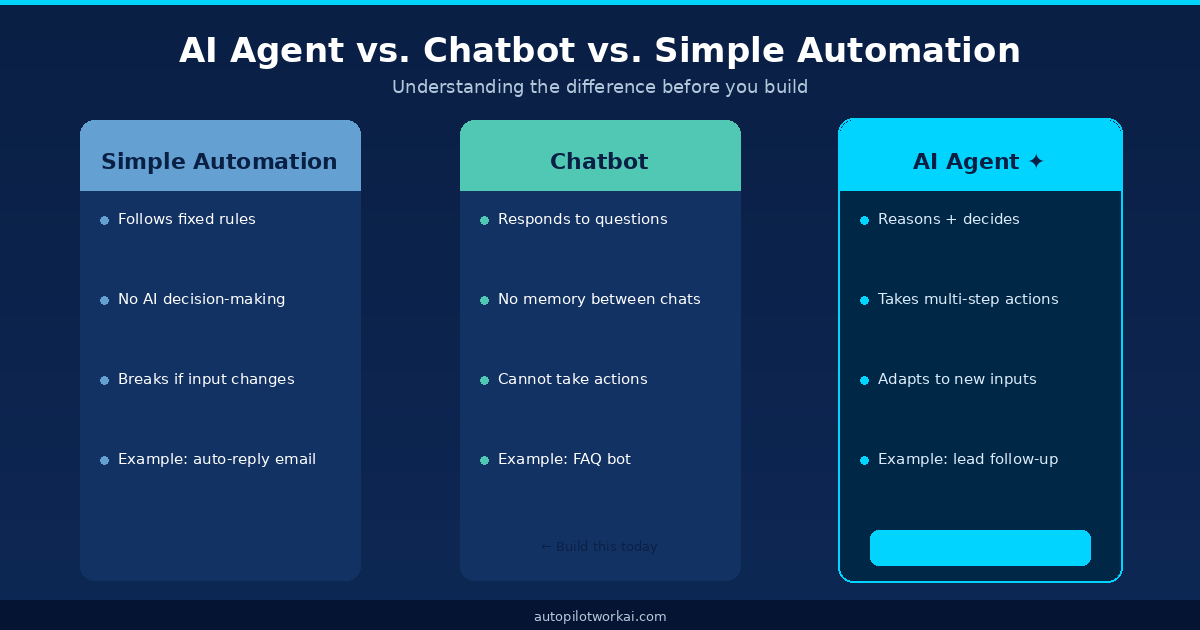
Figure 1 — Three distinct categories. Most people have only used the middle one.
A simple automation (like a basic Zapier zap) follows a fixed script. If a contact submits your form, it adds them to a spreadsheet. No judgment. No flexibility. If the input changes slightly, it breaks.
A chatbot responds to questions within a conversation window. It has no persistent memory and cannot trigger actions in other systems. It waits to be asked.
An AI agent combines both capabilities and adds a reasoning layer. It receives a trigger (a new lead form submission), processes that input using a large language model, makes a decision about what to do next, executes one or more actions (draft email, check CRM, update sheet), and reports the result — all without human involvement.
This is not a marginal difference. For freelancers and agency owners, an AI agent can compress 15 minutes of manual follow-up work per lead into zero minutes. At scale, that compounds quickly. A Forrester report on automation ROI found that time savings from intelligent automation average 4.2 hours per employee per week — and that figure was calculated before modern AI agent tooling became mainstream.
The 4-Step Architecture Every No-Code AI Agent Follows
Regardless of the platform, the tool, or the use case, every AI agent you will ever build follows the same four-part loop. Understanding this before you open Make.com means you will never feel lost inside the interface.
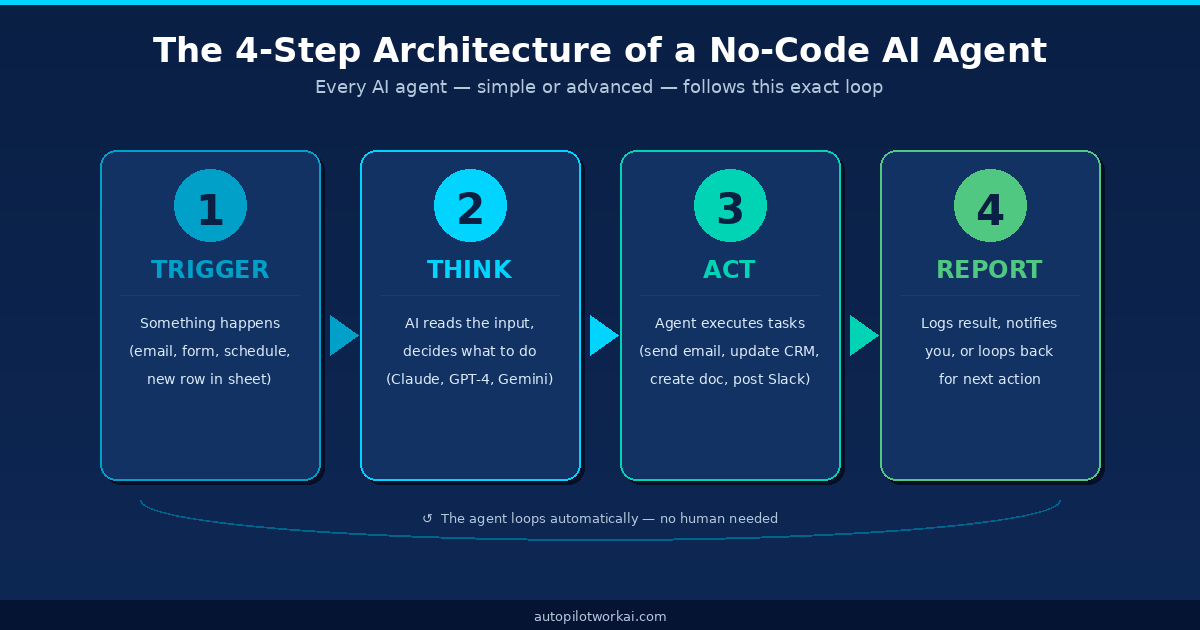
Figure 2 — Every AI agent runs this loop. You are about to build one that does it in real time.
Step 1 — Trigger
Something in the real world kicks the agent awake. A new row in a Google Sheet. An email arriving in a specific inbox. A form submission. A scheduled time. In our build today, the trigger is a new lead submitted via a Google Form.
Step 2 — Think
The raw input is sent to an AI model (GPT-4o, Claude Sonnet, or Gemini — your choice). The model reads a system prompt you write — which defines its role, rules, and output format — then generates a structured response. This is the “brain” of the agent.
Step 3 — Act
Based on the AI’s output, Make.com executes one or more downstream actions. In our case: it takes the personalised email the AI drafted and sends it via Gmail. More complex agents branch here — sending to Slack if a lead meets certain criteria, updating a CRM, or generating a PDF.
Step 4 — Report
The agent logs what it did — typically appending a row to a Google Sheet or sending a Slack notification to you. This is optional for basic builds but essential once your agent is handling volume.
The most common mistake first-time builders make is skipping the Report step. Three weeks in, you will want to know why the agent did what it did to a specific lead. Build the log from day one.
Build AI Agent No Code: Choosing the Right Platform in 2026
Three platforms dominate the no-code AI agent space right now. Here is how they compare for your specific situation as a freelancer or small agency owner:
| Platform | Free Tier | AI Modules Built-in | Learning Curve | Best For | Starting Price |
|---|---|---|---|---|---|
| Make.com ✦ Recommended | ✔ 1,000 ops/mo | ✔ OpenAI, Claude, Gemini | Low–Medium | Freelancers & agencies | Free → $9/mo |
| Zapier | Limited (100 tasks) | ✔ OpenAI, Anthropic | Low | Simple 2-step automations | Free → $19.99/mo |
| n8n | ✔ Self-hosted free | ✔ All major LLMs | High | Developers & power users | Free (self-hosted) |
Make.com wins for this guide for three reasons. Its visual canvas makes multi-step agent logic easy to read and debug. Its free tier is genuinely usable (1,000 operations per month covers a small agency’s needs easily). And its native AI modules connect to every major model without requiring custom API code. For a deeper comparison, see our guide on Make.com vs Zapier for agency owners.
Build Your First No-Code AI Agent: The 30-Minute Step-by-Step
Open Make.com in one tab and this guide in another. The build we are creating is a lead follow-up agent. When someone fills in your contact or inquiry form, the agent reads the submission, drafts a personalised first-response email using AI, sends it from your Gmail account, and logs the action to a Google Sheet.
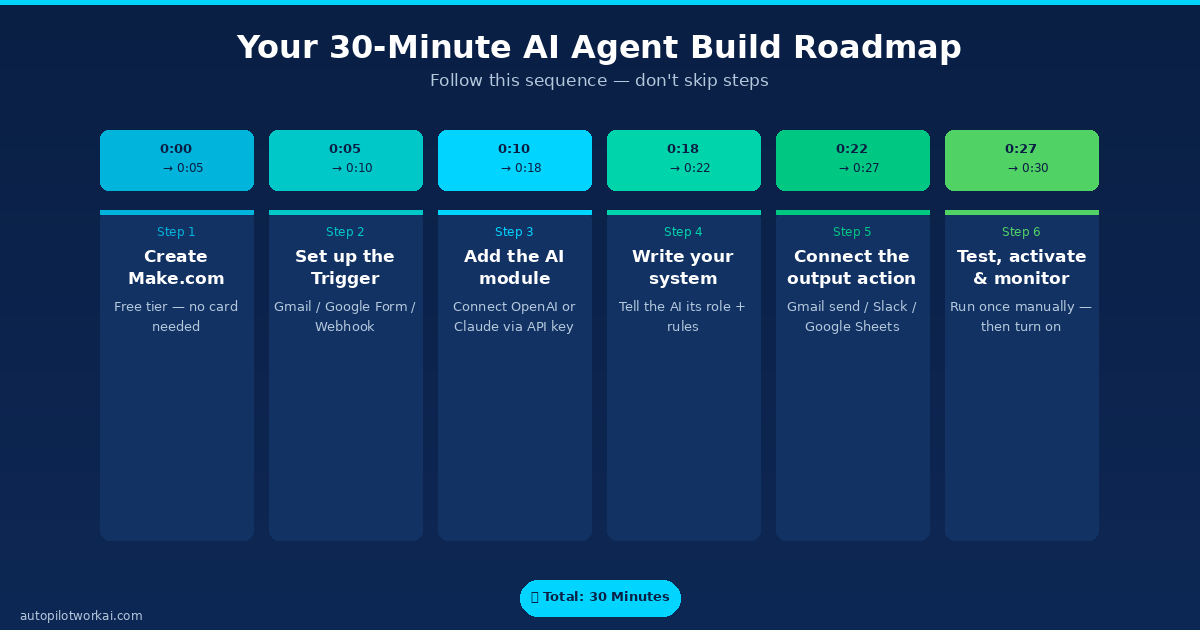
Figure 3 — The exact sequence. Do not skip the test step before activating.
Create your Make.com account
Go to make.com and sign up with Google. No credit card required. Select the free plan. Once inside, click Create a new scenario. A blank canvas appears — this is where your agent lives.
Set up the Trigger module (Google Forms)
Click the large + on the canvas. Search for Google Forms and select Watch Responses. Connect your Google account when prompted. Select the specific form you want to monitor — this is your inquiry or contact form. Set the trigger to run Immediately. Make.com will now watch that form for new submissions in real time.
Add the AI module (OpenAI or Claude)
Click + again to add a second module. Search for OpenAI (or Anthropic if you prefer Claude). Select Create a Completion. Connect your API key — you can get one from platform.openai.com for OpenAI or from the Anthropic console for Claude. Set the model to gpt-4o or claude-sonnet-4.
Write your system prompt
This is the most important step. In the Messages field, add a System message and paste a prompt like this one — then customise it for your business:
“You are a professional assistant for [Your Business Name]. A new inquiry has arrived. The person’s name is {{Name}}, their email is {{Email}}, and their message is: {{Message}}. Write a warm, professional first-response email in under 120 words. Address them by first name. Confirm you received their inquiry. State you will be in touch within 24 hours. Sign off as [Your Name].”
The {{variables}} in double curly braces are automatically mapped from your Google Form fields by Make.com.
Connect the output action (Gmail Send)
Add a third module. Search for Gmail and select Send an Email. Connect your Gmail account. In the To field, map the email address from the Google Form trigger. In the Subject field, type something like: Re: Your inquiry to [Your Business Name]. In the Content field, map the AI output from step 3 — this is the generated email body. Optionally, add a fourth module for Google Sheets to log the interaction.
Test, activate and monitor
Click Run once at the bottom of the canvas. Submit a test entry to your Google Form. Watch the agent execute in real time — each module lights up as it processes. Check the email landed correctly. If everything looks right, toggle the scenario to Active. Your agent is now live. It will run automatically every time someone submits your form.
GPT-4o charges approximately $0.005 per email generated at this prompt length. For 200 leads per month, that is $1.00 in API costs. Claude Sonnet is similarly priced. Keep this in mind when scaling — but at these volumes, the cost is negligible compared to the time saved.
What Your AI Agent Can Do Next: 5 Upgrade Paths Worth Building
Your first agent is intentionally simple. That is by design — a focused agent is easier to debug, maintain, and trust. Once it has run reliably for one to two weeks, here are the five most valuable upgrades you can layer on without touching any code.
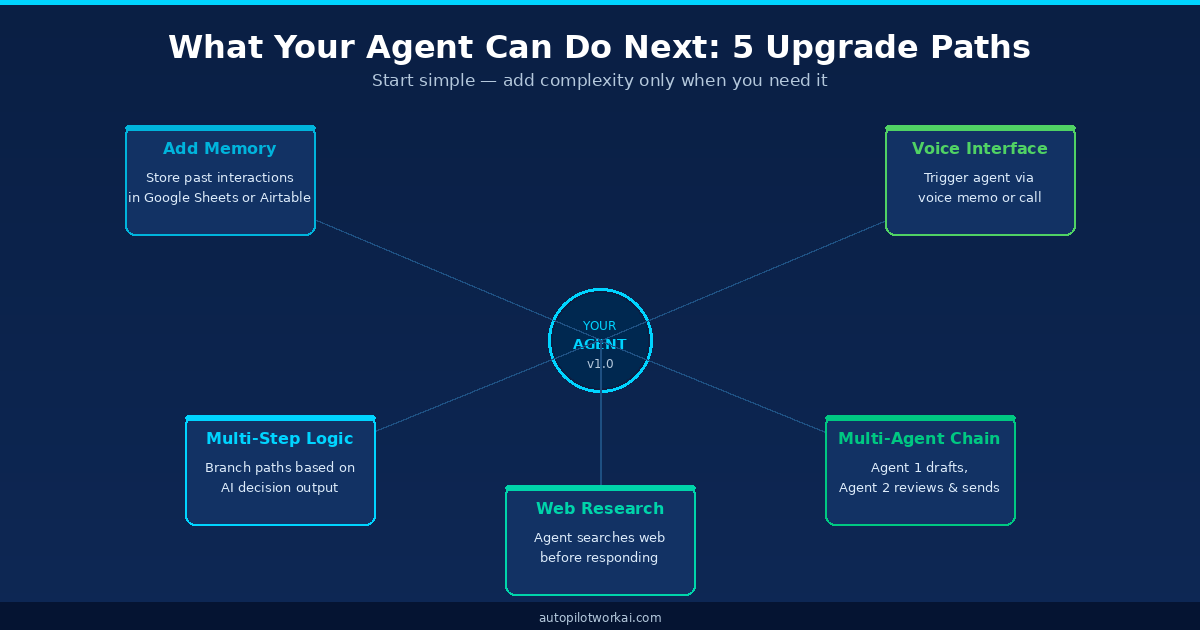
Figure 4 — Add complexity incrementally. Each upgrade is a self-contained Make.com module.
- Add memory via Google Sheets. Store every lead interaction in a running log. On the next trigger, the agent reads the log first — so it knows whether it has already contacted this person and adjusts its tone accordingly.
- Add conditional branching. Use Make.com’s Router module to split the workflow. If the lead mentions a specific service, route them down a specialised response path. If they mention a competitor, flag for manual review instead of auto-sending.
- Add web research. Before drafting the response, add a Perplexity or Brave Search module. The agent looks up the lead’s company, pulls key context, and references it in the email. Response quality jumps immediately.
- Chain a second agent. Agent 1 drafts the email. Agent 2 receives that draft, evaluates it against a quality rubric you define, and either approves it for sending or rewrites it. This is a basic multi-agent chain — and it produces substantially better output than a single pass.
- Add a voice trigger. Tools like Bland.ai or Vapi.ai can connect to your Make.com scenario. A potential client calls your business number, leaves a voicemail, and the agent transcribes and processes it within seconds. Explore our article on AI productivity workflows for solopreneurs for more patterns like this.
For context on how no-code automation platforms have evolved to support these patterns, the Gartner low-code market forecast projects that by 2026, 80% of technology products will be built by people who are not professional developers. AI agent tooling is the leading edge of that shift.
Three Build AI Agent No Code Mistakes to Avoid on Your First Run
These are the errors that cause first-time builders to abandon their agent within the first week — not because the technology failed, but because the setup was fragile.
Mistake 1 — An undertested system prompt
The quality of your agent’s output is directly proportional to the quality of your system prompt. Vague instructions produce vague emails. Before activating, test your prompt manually in ChatGPT or Claude.ai with five different fictional lead submissions. Refine until the output is consistently at the level you would send yourself.
Mistake 2 — No error handling
Make.com scenarios fail silently if a module encounters an error — for example, if the Gmail module rejects an email due to a missing address field. Add a Break or Ignore error handler to each module, and route errors to a Slack notification or email alert so you know when something breaks. The Make.com error handling documentation covers this in full.
Mistake 3 — Activating before a manual test run
Always run the scenario manually at least twice before toggling it to Active. A live agent that sends a malformed email to a real lead does more damage than no automation at all. Use Make.com’s Run once function with test data until you are confident the output is what you expect.
If you are deciding which no-code platform to commit to for the long term, see our comparison of the best no-code automation platforms for freelancers before investing more than one hour in any single tool.
Frequently Asked Questions
The Bottom Line
Building your first no-code AI agent is a one-time 30-minute investment that pays back daily. The lead follow-up agent in this guide handles a task that most freelancers spend 15–20 minutes on per inquiry — manually, inconsistently, and often too slowly to convert. Once active, it runs without you.
The next step is straightforward: open Make.com, follow the six steps above, and activate your first scenario before the end of today. Once you see it execute on a real lead, the mental model for everything else — more complex agents, multi-step chains, voice triggers — clicks into place immediately.
Ready to Build Your First AI Agent?
Start with Make.com’s free tier — no credit card, no time limit. 1,000 operations per month included.