
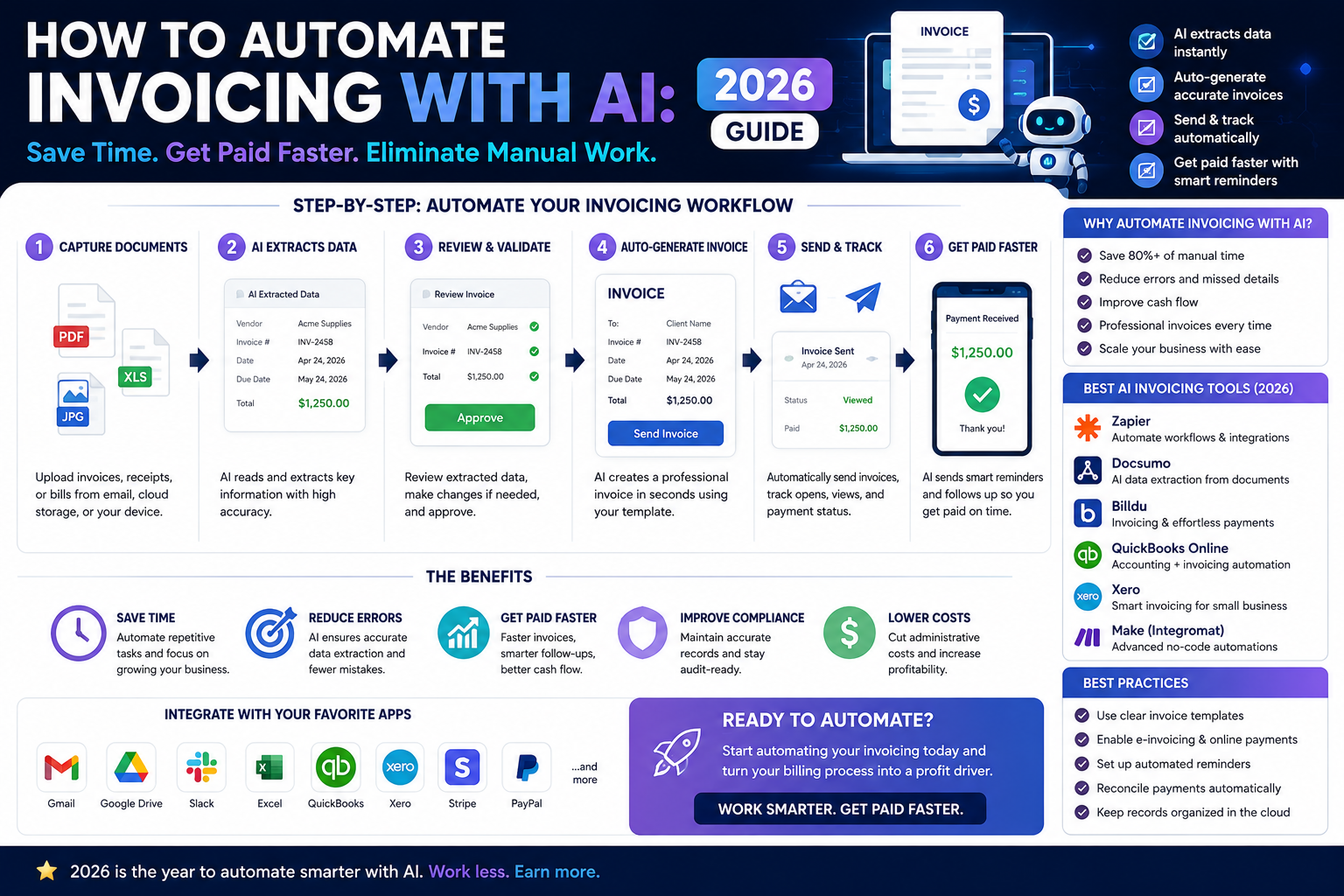
How to Automate Invoicing with AI: The Complete Workflow for Freelancers and Solopreneurs
How to automate invoicing with AI is one of the highest-ROI questions a freelancer or solopreneur can ask in 2026. According to a 2025 FreshBooks Self-Employed Report, independent professionals spend an average of 4.3 hours per week on invoicing, payment follow-ups, and billing admin — time that generates zero revenue. At a $75/hour rate, that is $16,770 per year in lost billable time. AI invoicing automation eliminates most of that overhead entirely. This guide shows you exactly how to build the system, which tools to use, and what a fully automated invoicing workflow looks like in practice.
TL;DR — Key Takeaways
- AI invoicing automation can save 3-5 hours per week for freelancers billing 5+ clients monthly.
- The full workflow covers four layers: invoice creation, delivery, payment reminders, and bookkeeping — all automated.
- FreshBooks and HoneyBook are the strongest all-in-one AI invoicing platforms for solopreneurs in 2026.
- Make.com or Zapier connect your invoicing tool to your CRM, calendar, and accounting software without manual data entry.
- You do not need accounting knowledge to build this system — the setup takes one afternoon and runs indefinitely.
How to Automate Invoicing with AI: What the Full System Actually Looks Like
How to automate invoicing with AI is not just about generating invoice PDFs faster. A complete AI invoicing system handles five distinct tasks that freelancers currently do manually: creating the invoice from project data, sending it to the right client at the right time, following up on unpaid invoices without awkward personal messages, reconciling payments against your books, and flagging overdue accounts before they become cash flow problems.
Most freelancers automate only the first step — invoice generation — and still spend hours on the other four. This guide covers the full chain. According to McKinsey’s 2025 automation research, finance and billing workflows are among the highest-value targets for AI automation in small business operations, with average time savings of 73% after full implementation.
The five layers of a complete AI invoicing workflow
- Invoice generation — AI creates the invoice from project data, time logs, or a completed contract milestone
- Automated delivery — Invoice sent to client automatically at the right moment without manual triggering
- Payment reminder sequence — AI sends follow-up messages at day 3, day 7, and day 14 if unpaid
- Payment reconciliation — Payment confirmed → bookkeeping entry created automatically
- Overdue escalation — AI flags and escalates accounts beyond 30 days with a different message tone
Best AI Tools for Invoicing Automation in 2026: Full Comparison
Before building the workflow, you need the right foundation tool. The platforms below differ significantly in how much AI they apply to invoicing versus how much manual setup they still require.
| Tool | Best For | AI Features | Starting Price | Verdict |
|---|---|---|---|---|
| FreshBooks | Freelancers, service businesses | Auto-reminders, late fee rules, expense AI | $17/month | ⭐⭐⭐⭐⭐ |
| HoneyBook | Creative freelancers, agencies | Smart invoice scheduling, contract-to-invoice AI | $19/month | ⭐⭐⭐⭐⭐ |
| QuickBooks | Solopreneurs needing full accounting | AI categorization, auto-reconciliation | $30/month | ⭐⭐⭐⭐ |
| Bonsai | Freelancers wanting all-in-one | Contract + invoice + reminder automation | $21/month | ⭐⭐⭐⭐ |
| Stripe + Make.com | Tech-savvy solopreneurs, custom workflows | Fully custom AI automation via API | $9/month + Stripe fees | ⭐⭐⭐⭐½ |
Prices reflect Q1 2026 rates. Always verify current pricing on each platform’s official site before purchasing.
How to Automate Invoicing with AI: Step-by-Step Setup Guide
The following workflow uses FreshBooks as the invoicing core and Make.com as the automation layer — the most reliable combination for solopreneurs in 2026 with no technical background. If you are still deciding between automation platforms, read our breakdown of Make.com vs Zapier for solopreneurs before continuing.
Step 1: Set up your invoice template with AI-filled fields
Inside FreshBooks, create a master invoice template that pulls data dynamically: client name, project name, line items, and due date. In 2026, FreshBooks’ AI layer pre-fills line items based on your logged time entries and project notes — eliminating manual data entry for recurring client work. Set your payment terms (net 14 or net 30), late fee percentage, and accepted payment methods once. Every future invoice inherits these settings automatically.
Step 2: Connect your project management tool via Make.com
The trigger for your invoice should never be “you remembering to send it.” Connect your project management tool (Notion, Asana, or Trello) to FreshBooks via Make.com. Create a scenario where marking a project milestone as “Complete” in your PM tool automatically triggers invoice creation in FreshBooks with the correct client data pulled from the project record. This single connection eliminates the most common invoicing delay: forgetting to bill after finishing work.
Step 3: Automate the delivery sequence
Configure FreshBooks to send the invoice automatically upon creation — no manual send button required. In the same Make.com scenario, add a Slack or email notification to yourself confirming the invoice was sent, including the invoice number and amount. This gives you visibility without requiring action.
Step 4: Build the AI payment reminder sequence
This is where most freelancers recover the most time. Inside FreshBooks, enable automatic payment reminders with the following sequence:
- Day 3 after due date: Friendly reminder — “Just checking in on invoice #[number]”
- Day 7 after due date: Direct follow-up — “Payment is now 7 days overdue”
- Day 14 after due date: Final notice with late fee applied automatically
Each message is pre-written once and sent automatically. You never have to write an awkward payment chaser again. FreshBooks’ AI adjusts the tone based on client payment history — softer for long-term clients who occasionally pay late, more direct for new clients.
Step 5: Automate payment reconciliation and bookkeeping
When a client pays, Make.com detects the payment confirmation from FreshBooks and triggers two actions simultaneously: marking the project as financially closed in your PM tool, and creating a categorized income entry in your accounting software (QuickBooks or a Google Sheet if you keep simple books). Zero manual bookkeeping. Zero missed entries at tax time.
Step 6: Set up the overdue escalation alert
Create a Make.com scenario that runs weekly, scanning FreshBooks for invoices more than 30 days overdue, and sends you a summarized Slack or email report. This replaces the mental overhead of tracking outstanding payments across multiple clients — the system surfaces the problem, you decide the action.
AI Invoicing Automation for Freelancers: Real Workflow Time Savings
To make the ROI concrete, here is a before-and-after breakdown for a freelancer billing eight clients per month at an average invoice value of $2,500.
| Task | Manual Time | Automated Time | Weekly Saving |
|---|---|---|---|
| Invoice creation | 15 min × 8 = 2 hrs | 0 min (auto-triggered) | 2 hrs |
| Payment follow-ups | 10 min × 3 clients = 30 min | 0 min (auto-sent) | 30 min |
| Bookkeeping entries | 5 min × 8 = 40 min | 0 min (auto-logged) | 40 min |
| Overdue tracking | 20 min/week | 2 min (review report) | 18 min |
| Total | ~3.5 hrs/week | ~10 min/week | 3+ hrs/week saved |
At $75/hour, recovering 3 hours per week equals $11,700 per year in reclaimed billable capacity — from a system that costs under $30/month to run.
Common Mistakes When Setting Up AI Invoice Automation
The setup is straightforward, but three mistakes consistently cause the system to break down or underdeliver within the first month.
Mistake 1: Automating delivery before testing the template
Sending your first automated invoice to a real client without reviewing the output is a fast way to damage a professional relationship. Run three test invoices to a personal email address before activating automated delivery. Verify that client names, line items, amounts, and payment links all populate correctly. Automate delivery only after confirming the template is error-free.
Mistake 2: Using generic reminder copy
AI can send payment reminders automatically, but the words still matter. Generic reminder templates — “Your payment is overdue. Please pay immediately.” — damage client relationships and rarely accelerate payment. Write your own reminder copy once: professional, direct, and on-brand. The AI handles the scheduling; you control the tone.
Mistake 3: Not building a human review checkpoint for large invoices
Full automation works reliably for recurring invoices under $5,000. For large, custom, or first-time client invoices, build a one-step human review into the Make.com scenario — where you receive a draft for approval before it sends. This takes 60 seconds and prevents costly errors on high-value work.
Scaling Your AI Invoicing Workflow as Your Business Grows
The system described above handles 5-20 clients per month comfortably with no changes. As your business grows beyond that, two additions extend the workflow without adding manual overhead.
First, add a client portal. FreshBooks and HoneyBook both offer client-facing portals where clients can view all invoices, payment history, and outstanding balances without emailing you for updates. This alone eliminates a significant volume of “did you receive my payment?” back-and-forth. Second, integrate your invoicing system with your proposal or contract tool. HoneyBook handles this natively — a signed contract automatically generates a deposit invoice and schedules the final invoice at project completion. For solopreneurs using separate tools, Make.com bridges the gap. For a broader view of how automation tools fit together in a solo business, see our guide on best AI agents for content creators — many of the same workflow principles apply across business functions.
According to Statista’s 2025 SMB Automation Survey, solopreneurs who fully automate their billing cycle report 40% faster average payment times compared to those using manual invoicing — a direct cash flow improvement beyond the time savings.
Frequently Asked Questions: How to Automate Invoicing with AI
Do I need technical skills to automate my invoicing with AI?
No. FreshBooks and HoneyBook have built-in automation features that require zero coding or technical setup. For connecting multiple tools (like your PM app and accounting software), Make.com’s visual builder is learnable in one afternoon with no programming background. The full system described in this guide requires no developer skills at any stage.
Is AI invoicing automation safe for client data and payment information?
Yes, when using reputable platforms. FreshBooks, HoneyBook, and QuickBooks are SOC 2 compliant and use bank-level encryption for payment data. Make.com processes workflow data through encrypted connections. Never route actual payment card numbers through automation scenarios — use payment links that redirect clients to the platform’s secure payment page instead.
What happens if an automated invoice contains an error?
Build a notification step into your Make.com scenario so you receive a confirmation every time an invoice sends — including the amount and client name. If you spot an error, most invoicing platforms allow you to void and reissue a corrected invoice within minutes. For high-value invoices, add a draft-review checkpoint before automated sending as described in the setup guide above.
Can I automate invoicing if I charge different rates for different clients?
Yes. FreshBooks and HoneyBook support per-client rate cards, meaning each client profile stores their specific pricing. The AI pulls the correct rate for each invoice automatically — no manual rate lookup required. You set the rates once per client; the system applies them correctly to every invoice going forward.
How long does it take to set up a full AI invoicing automation system?
For the FreshBooks + Make.com workflow described in this guide: expect 2-4 hours for initial setup, including creating your template, writing reminder copy, and configuring the Make.com scenarios. After that, the system requires approximately 10 minutes of weekly review to check the overdue report and confirm invoices are sending correctly.
Can AI automation handle recurring retainer invoices?
Yes — this is one of the strongest use cases. FreshBooks, HoneyBook, and QuickBooks all support recurring invoice schedules that send automatically on a defined cycle (weekly, monthly, quarterly) without any manual triggering. For retainer clients, set it up once and the invoice arrives in their inbox on the same date every month indefinitely.
What is the cheapest way to automate invoicing with AI as a new freelancer?
Start with FreshBooks at $17/month — it includes automatic reminders and recurring invoices natively, covering 80% of the workflow without needing Make.com. Add Make.com’s free plan (1,000 operations/month) for project-trigger automation once you have more than three active clients. Total cost at entry level: $17/month for a system that saves hours every week.
The Bottom Line: How to Automate Invoicing with AI in 2026
How to automate invoicing with AI is a one-afternoon project that pays dividends every single week indefinitely. The freelancers and solopreneurs still sending invoices manually, chasing payments personally, and logging income by hand are not just losing time — they are losing the mental clarity that comes from removing repetitive admin from their working day entirely.
The system works: trigger from project completion, auto-generate from template, send automatically, remind automatically, reconcile automatically. You stay in the loop via notifications, review the overdue report once a week, and spend the recovered hours on billable work or business growth.
Start with FreshBooks if you want the simplest path to a working system today. Add Make.com when you are ready to connect your broader workflow stack. The entire setup costs less per month than one hour of your own time — and saves dozens.
| Try FreshBooks Free → | Try HoneyBook Free → | Try Make.com Free → |