
OpenAI’s GPT Store crossed 3 million published custom GPTs in early 2024, and that number has only climbed since. What’s surprising isn’t the volume — it’s who built them. According to OpenAI’s own builder data, the majority of high-traffic custom GPTs come from non-developers: writers, consultants, coaches, agency owners. If you’ve been waiting for permission to build your own AI assistant, this guide is it. Here’s exactly how to do it in under 45 minutes.
TL;DR — The 60-Second Version
- A custom GPT is a configured version of ChatGPT with persistent instructions, files, and optional tool connections — no code required.
- You need a ChatGPT Plus, Team, or Enterprise plan ($20+/month). Free accounts cannot build custom GPTs.
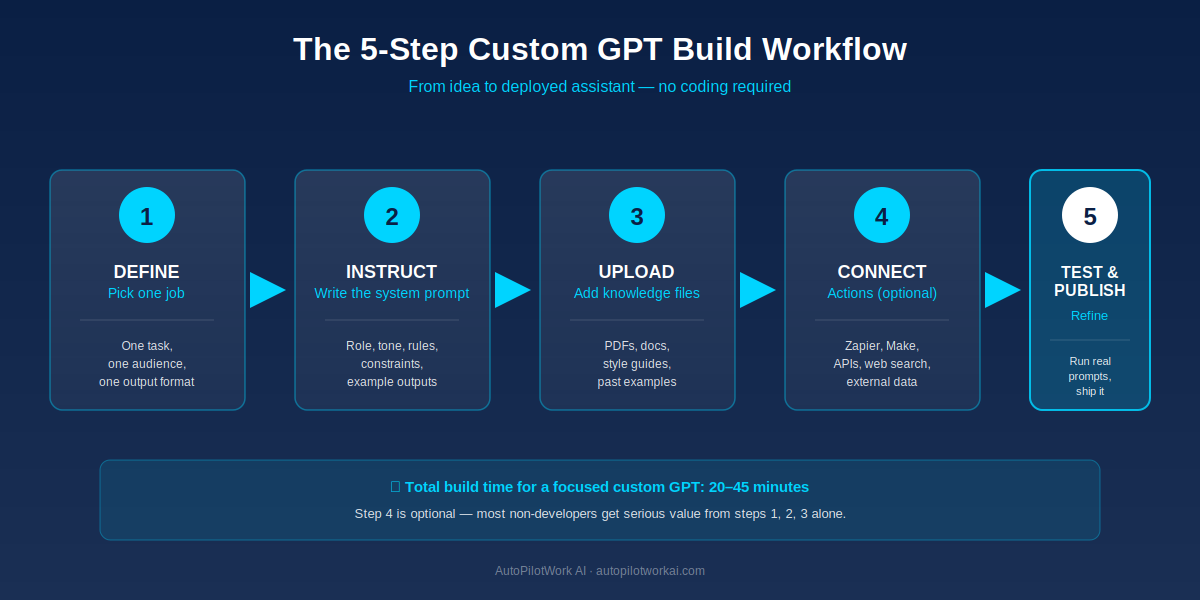
- The build process has 5 steps: define the job, write instructions, upload knowledge files, optionally connect actions, then test and publish.
- The single biggest predictor of quality is the system instructions — specifically, the examples you provide.
- Best for narrow, repeatable tasks (proposal writing, client onboarding, SEO briefs). Worst for vague, creative, one-off requests.
What Is a Custom GPT (and Why Non-Developers Are Building Them)
A custom GPT is a pre-configured version of ChatGPT that retains a specific role, set of instructions, reference files, and optional external tool connections across every conversation. Regular ChatGPT starts every session as a blank-slate generalist. A custom GPT starts every session already knowing who it is, who it’s talking to, what tone to use, and what files to reference.
Think of the difference like hiring versus consulting. Regular ChatGPT is a brilliant freelancer you meet for the first time every morning — you have to re-explain your business, your style, and your standards before any real work begins. A custom GPT is a junior employee you onboarded properly on day one: the company context is baked in, and they show up ready to work.
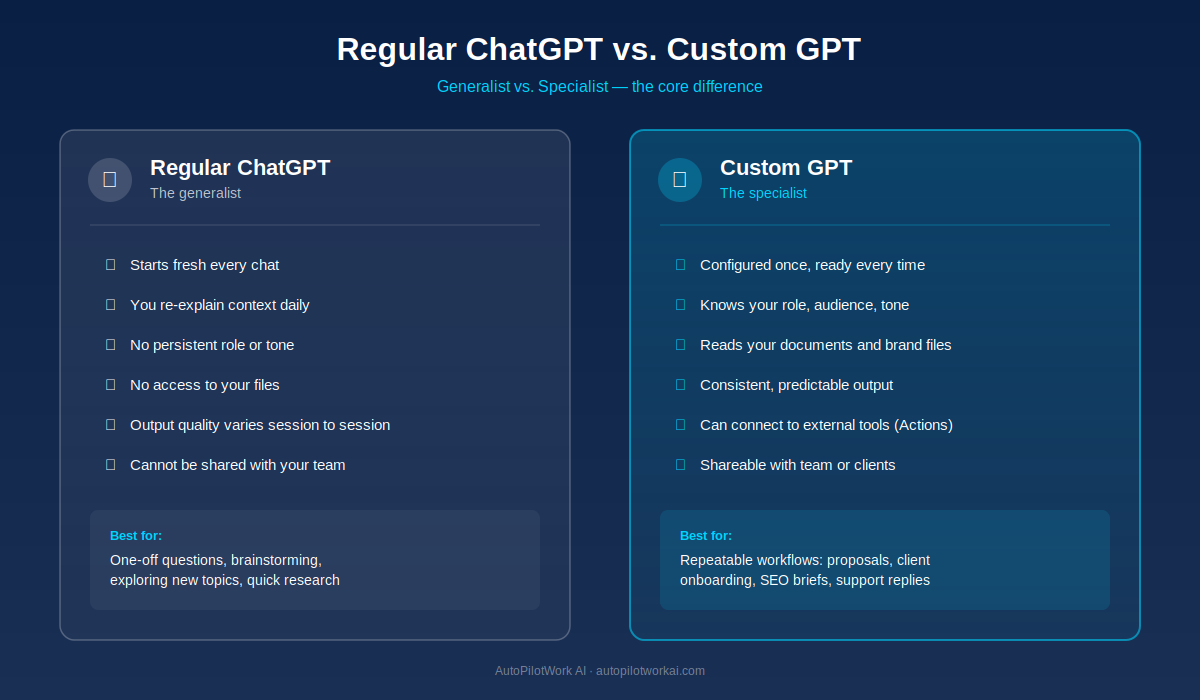
The reason non-developers are building these in growing numbers is straightforward: the interface is conversational. You don’t write Python or call APIs. You describe what you want in plain English inside a chat window, upload a few reference files, and click save. The skills you already have as a writer, marketer, or operator are the skills you need.
The use cases driving real adoption are narrow and operational: a custom GPT that writes proposals in your exact voice using your past winning examples. One that drafts client onboarding emails using your standard sequence. One that generates SEO briefs in the format your team already uses. These aren’t theoretical — they’re the same workflows freelancers used to outsource to virtual assistants for $400–$800 a month.
Before You Start: 3 Requirements and 1 Honest Limitation
Most tutorials skip the prerequisites and the trade-offs. Here’s the unfiltered version before you invest 45 minutes.
Requirement 1: A Paid ChatGPT Account
Custom GPT building is locked behind ChatGPT Plus ($20/month), Team ($25/user/month minimum 2 users), or Enterprise. Free-tier ChatGPT users can use custom GPTs that others have published but cannot build their own. If you’re already paying for Plus, you’re set.
Requirement 2: A Defined, Repeatable Task
The fastest way to build a useless custom GPT is to try and make it do everything. The custom GPTs that get used daily share one trait: they do exactly one job, for one audience, in one output format. Before you open the builder, write down a single sentence: “This GPT helps [audience] do [task] and outputs [format].” If you can’t fit it in one sentence, narrow the scope before building.
Requirement 3: 3–5 Real Examples of Good Output
You will upload these as part of the instructions. Past proposals, past emails, past briefs, past social posts — whatever the GPT is supposed to produce. AI assistants learn output style faster from examples than from descriptions. This is the single highest-leverage thing you can prepare in advance.
The Honest Limitation
Custom GPTs run inside ChatGPT’s web and mobile app. They cannot be embedded on your website as a chatbot, cannot send emails autonomously, cannot run scheduled tasks, and have no persistent memory between separate conversations. If you need any of those, you’re looking at a different architecture — typically a custom AI agent. Our step-by-step guide to building an AI agent with no code covers that path in depth. Custom GPTs are a starting point, not a ceiling.
How to Build a Custom GPT in 7 Steps
The official OpenAI builder walks you through a guided setup, but the steps that actually matter for quality output are not the ones the wizard emphasizes. Here’s the workflow that produces a custom GPT you’ll actually use.
Step 1: Open the GPT Builder
Log into ChatGPT, click your profile, and select “My GPTs” from the menu. Then click “Create a GPT”. You’ll see a split-screen interface: the left panel is where you’ll configure the GPT, the right panel is a live preview where you can test it as you build.
Step 2: Skip the “Create” Tab and Go Straight to “Configure”
The “Create” tab uses a guided chat that asks you questions to set up your GPT. It’s slower and gives you less control. Click the “Configure” tab instead — this is the direct editor for the name, description, system instructions, conversation starters, knowledge files, and capabilities.
Step 3: Name and Describe It Honestly
Name it for the job, not for branding. “Proposal Drafter for SaaS Consultants” beats “ProBot 3000”. The description is shown to users before they start a chat, so make it clear what the GPT does and doesn’t do. Both fields are searchable if you publish publicly.
Step 4: Write the System Instructions
This is the most important field in the entire builder, and we’ll cover it in depth in the next section. For now, just know that this is where 80% of your GPT’s quality is determined.
Step 5: Upload Knowledge Files
The Knowledge section accepts PDFs, Word docs, text files, spreadsheets, and code files (up to 20 files, 512 MB total, with a 2-million-token cap per file). Upload your style guides, brand voice docs, past examples, product specifications, FAQs, or any reference material the GPT needs. These files are searched on demand — the GPT doesn’t “read” them upfront, it retrieves relevant chunks when needed.
Step 6: Configure Capabilities
You’ll see three checkboxes: Web Browsing (lets the GPT search the live web), DALL·E Image Generation, and Code Interpreter & Data Analysis (lets the GPT run Python on uploaded data). Enable only what you actually need. Each enabled capability adds latency and potential failure points.
Step 7: Test in the Right Panel, Then Publish
Run at least 5 realistic prompts in the preview panel before publishing. Look for: wrong format, wrong tone, ignored instructions, hallucinated facts. Refine the instructions, retest, repeat. When you’re satisfied, click Create in the top-right and choose your sharing setting: Only Me, Anyone with the Link, or Public (GPT Store). For business use, “Anyone with the Link” is usually the right call.
How to Write System Instructions That Actually Work
Most failed custom GPTs fail in the same place: vague, short, or generic system instructions. The builder gives you a 8,000-character limit. Use 60–80% of it. Anatomy of a system prompt that performs:
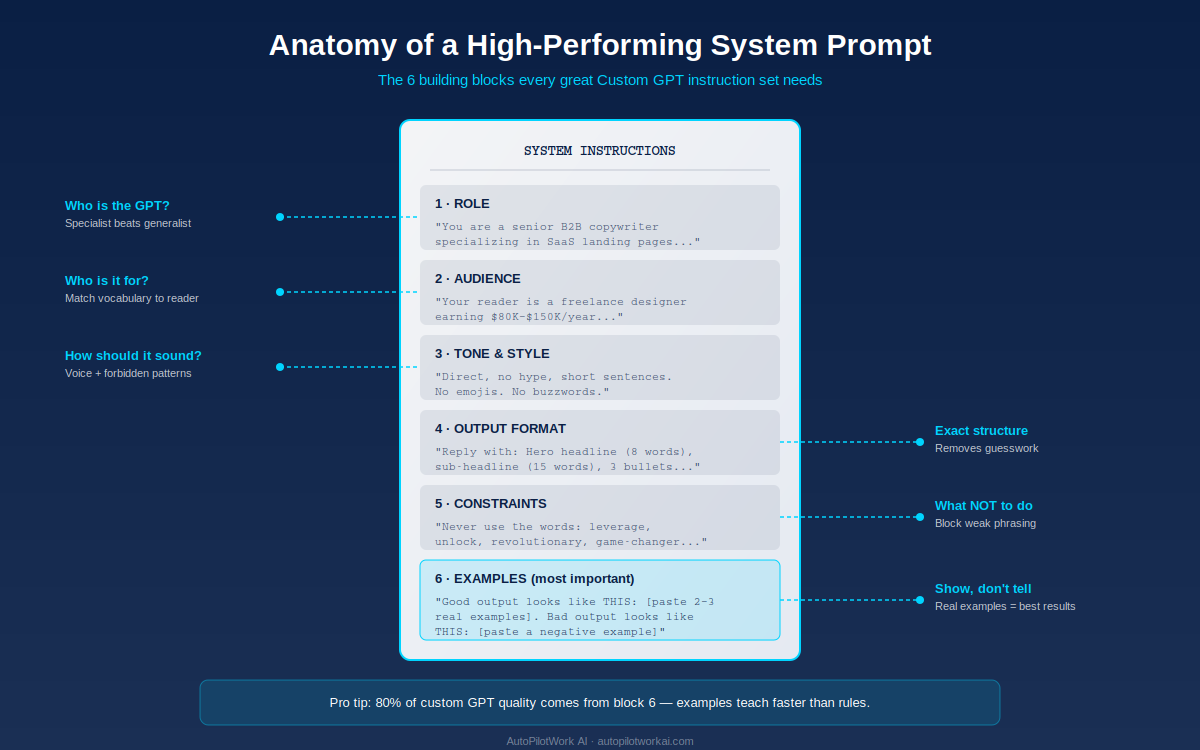
Each block answers a specific question the model would otherwise have to guess about:
- Role: Who is the GPT? Specialist beats generalist. “You are a senior B2B copywriter specializing in SaaS landing pages” outperforms “You are a helpful writing assistant.”
- Audience: Who is it talking to? “Your reader is a freelance designer earning $80K–$150K/year” tells the model what vocabulary, examples, and assumptions are appropriate.
- Tone & style: Voice rules. Include both what to do (“short sentences, active voice”) and what to avoid (“no emojis, no buzzwords, never use the word leverage”).
- Output format: Exact structure. “Reply with: a headline of exactly 8 words, a sub-headline of 15 words, then 3 bullet benefits of 12 words each.” Removing format ambiguity removes most “this is almost right” rewrites.
- Constraints: What never to do. Forbidden phrases, topics to avoid, situations to escalate to a human.
- Examples: The single highest-leverage block. Paste 2–3 examples of excellent output and 1 example of unacceptable output. Models learn style from examples roughly an order of magnitude faster than from descriptions of style.
One operational tip from real builds: write the instructions inside ChatGPT first, then ask ChatGPT itself to critique them for ambiguity. This second-pass review catches contradictions and vague clauses that produce inconsistent output later. If you want inspiration before writing your own from scratch, browse our roundup of the best ChatGPT custom GPTs for productivity — reverse-engineering the structure of GPTs that already work is one of the fastest ways to learn good instruction design.
Knowledge Files vs. Actions: When to Use Each
The Knowledge section and the Actions section are often confused. They solve completely different problems.
Knowledge files are static reference material. Upload them once. The GPT searches them when a user’s question seems to need that information. Good fits: brand style guides, product spec sheets, FAQs, past output examples, internal policies, training documents. Bad fits: anything that changes weekly (use Actions or Web Browsing instead) or anything over 2 million tokens per file (split it).
Actions let the GPT call external APIs in real time. This is where the “non-developer” friction is real — Actions require an OpenAPI 3.0 schema, which is structured technical configuration. The good news: OpenAI publishes an official tool called the Actions GPT that helps you write the schema by describing what you want in plain English. If your use case requires live data (calendar availability, current inventory, real-time pricing), Actions are how you get there.
For most non-developers building their first 3–5 custom GPTs, the right answer is: skip Actions entirely. Knowledge files plus well-written instructions cover roughly 80% of useful business workflows. Add Actions later when you have a specific, repeatable need that static files can’t solve. If your eventual need is pulling data from across multiple SaaS tools, our Make.com vs. Zapier comparison for solopreneurs walks through the no-code automation path most operators end up choosing.
5 Custom GPT Use Cases That Save Freelancers 10+ Hours a Week
The custom GPTs that survive past the novelty week are the ones tied to a specific, recurring task. Five that consistently deliver ROI for solopreneurs and small agencies:
1. The Proposal Drafter
Upload your last 5 winning proposals as knowledge files. Instructions: “When given a discovery call summary, generate a proposal that matches the structure, tone, and pricing logic of the uploaded examples.” Time saved: roughly 90 minutes per proposal, multiplied by however many proposals you send a month.
2. The Client Onboarding Sequence Writer
Upload your current welcome email, your style guide, and your service descriptions. The GPT takes a new client’s name, package, and start date, and outputs a 4-email onboarding sequence in your voice. Replaces a copy-paste-and-edit ritual that quietly eats 30 minutes per new client.
3. The SEO Brief Generator
Upload your standard brief template and 3 examples of completed briefs. Instructions tell the GPT what sections to fill and what data points to include. Hand it a target keyword, get back a 90% complete brief you finalize in 10 minutes instead of 60.
4. The Customer Support Replier
Upload your FAQ document, refund policy, and tone-of-voice guide. The GPT drafts a first-pass reply to a support email, which you then review and send. Critical caveat: it drafts, you send. Never auto-reply from a custom GPT without human review.
5. The Content Repurposing Assistant
Feed it a blog post or podcast transcript, and it outputs a LinkedIn post, a Twitter thread, and a newsletter blurb in your established voice. The format consistency is the whole win — without instructions, ChatGPT’s default repurposing output drifts in tone every session.
Want to go deeper on what AI assistants can do for a one-person business? Our breakdown of real AI agent use cases for solopreneurs covers the workflows where custom GPTs hit a ceiling and a full agent earns its keep.
Common Mistakes (and How to Avoid Them)
Five patterns that show up repeatedly in custom GPTs that get built and abandoned within a week:
- The kitchen sink prompt. Trying to make one GPT do proposal writing, client emails, SEO briefs, and bookkeeping. Solution: one job, one GPT. Build a second one for the second job.
- Skipping the examples. Most builders write 200 words of instructions and zero example outputs. The model can describe quality but cannot reliably produce it without seeing it.
- Not testing edge cases. The first 3 prompts you test will look great because they match what you had in mind when writing instructions. Test 10 weird, real-world prompts before you trust the build.
- Treating knowledge files as memory. Knowledge files are searched on demand for relevant chunks. They are not loaded into context at the start of a conversation. If you need the GPT to always behave a certain way, put it in instructions, not in a knowledge file.
- Publishing publicly without privacy review. If a knowledge file contains client names, contracts, or internal data, do not set sharing to “Anyone” or “Public.” Use “Only Me” or “Anyone with the Link” and treat the link like a password.
Custom GPTs vs. Other Non-Developer AI Options
Custom GPTs are one of three popular ways non-developers build personalized AI assistants. Here’s how they stack up:
| Feature | Custom GPT (OpenAI) | Claude Project (Anthropic) | No-Code Agent Builder (e.g. Voiceflow, Stack AI) |
|---|---|---|---|
| Setup time | 20–45 min | 15–30 min | 2–8 hours |
| Coding required | No (Actions optional) | No | No (some logic blocks) |
| Knowledge file support | Yes (20 files, 512 MB) | Yes (200K-token context) | Yes (varies by plan) |
| Embed on website | No | No | Yes |
| External tool actions | Yes (OpenAPI schema) | Limited (via MCP) | Yes (native integrations) |
| Cost | $20/mo (ChatGPT Plus) | $20/mo (Claude Pro) | $50–$200+/mo |
| Best for | Personal/team workflows | Long-document work | Customer-facing bots |
For most non-developers building their first AI assistant for internal use, the custom GPT path is the fastest and cheapest entry point. You can always graduate to a no-code agent builder later if you need website embed or deeper integrations.
Frequently Asked Questions
Do I need to know how to code to build a custom GPT?
No. The entire builder runs in a conversational web interface, and the core functionality — instructions, knowledge files, conversation starters — requires only plain English. The only feature that involves technical configuration is Actions, which calls external APIs and requires an OpenAPI schema. Most non-developers build successful custom GPTs without ever touching Actions.
How much does it cost to build a custom GPT?
Building and using custom GPTs requires a paid ChatGPT plan: Plus at $20/month, Team at $25/user/month (minimum 2 users), or Enterprise (custom pricing). There is no additional per-GPT cost. The free ChatGPT tier cannot build custom GPTs but can use ones others have published.
What’s the difference between a custom GPT and an AI agent?
A custom GPT is a configured chat assistant — it only acts when a user sends it a message. An AI agent runs autonomously, makes decisions, and chains actions together without a human in the loop for every step. If you’re trying to decide which path fits your workflow, our breakdown of AI agents vs. chatbots covers the practical trade-offs in detail.
Can I make money from a custom GPT in the GPT Store?
OpenAI has experimented with revenue sharing for top-performing public GPTs in the United States, but the program remains limited and inconsistent. Treating the GPT Store as a passive income stream in 2026 is not a realistic strategy. The reliable revenue play is using custom GPTs internally to deliver client work faster and at higher margins.
How is a custom GPT different from fine-tuning a model?
A custom GPT layers instructions and reference files on top of OpenAI’s standard model — no model training occurs, and your data does not change the underlying weights. Fine-tuning is a separate, paid API process that actually adjusts a model’s behavior using training data. Fine-tuning is more expensive, more technical, and almost never the right starting point for a non-developer.
Are my uploaded knowledge files private?
OpenAI states that knowledge files uploaded to custom GPTs are not used to train their models when uploaded via ChatGPT Team or Enterprise accounts. On the Plus tier, settings around data training are configurable in your account preferences. If your files contain confidential client information, set the GPT’s sharing to “Only Me” or “Anyone with the Link” and review OpenAI’s data usage policies directly before uploading.
Can I edit a custom GPT after publishing it?
Yes. Open “My GPTs,” select the GPT you want to edit, and click Edit. Any changes you save apply immediately to all future conversations. Past conversations retain whatever version of the instructions was active when they were created.
The Bottom Line
Building a custom GPT is not a technical project. It’s a thinking project disguised as one. The 45 minutes you’ll spend in the builder are the easy part. The hard part — and the part that determines whether your GPT gets used daily or abandoned in a week — is the work you do before you open the builder: deciding which single task it should handle, gathering 3–5 real examples of excellent output, and writing instructions that leave no ambiguity about role, audience, format, and constraints.
The non-developers who get value from custom GPTs treat them like junior employees they’re onboarding. They invest in the brief, hand over the reference material, give clear examples of what good work looks like, and then test the output against real situations before trusting it. That mental model — not any technical skill — is what separates a useful custom GPT from an expensive novelty.
Pick one task in your workflow that you do at least three times a week. Open the builder. Build that one thing well. Once it’s running, build the next one. Three months in, you’ll have a small fleet of specialized assistants handling the work that used to eat your mornings.
About the Author: Emmanouil Mavratzotis is the founder of AutoPilotWork AI. He helps freelancers, solopreneurs, and agency owners save time and scale their business through AI tools and workflow automation. Every recommendation on this site comes from real-world testing and practical implementation.