
According to Anthropic’s Economic Index 2026, automation-style usage now accounts for 77% of business AI traffic on its API — meaning more than three out of four enterprise calls go to agents that act on their own, not chatbots that just talk. Yet most buyers still can’t name what’s inside one. The word “agent” gets thrown around like it means a single thing. It doesn’t. Every functioning AI agent is built from four distinct parts, and once you can see them clearly, the entire market stops feeling like magic and starts feeling like architecture.
TL;DR
- Every AI agent has four parts: an LLM brain, a memory layer, a tool layer, and a reasoning loop. Remove any one and you no longer have an agent.
- Memory is the most misunderstood component — it has four sub-types (short-term, long-term, episodic, semantic), and serious agents use all of them.
- Tools turn talk into action. Without them an agent is just an LLM with extra steps.
- The reasoning loop is what separates an agent from a chatbot — it plans, executes, observes results, and decides what to do next.
- You do not need to build all four yourself. A build-vs-buy matrix at the end shows which stack fits your project.
What an AI Agent Actually Is (and Isn’t)
An AI agent is a software system that takes a goal, breaks it into steps, uses external tools to execute those steps, and decides for itself what to do next based on the results. That is the entire definition. Notice what’s missing: there’s nothing about chat. Nothing about prompts. Nothing about conversation.
This is where most people get confused. A chatbot replies to a message. An agent pursues an outcome. If you ask ChatGPT to summarize a PDF, that’s a model call. If you ask an agent to “find me three suppliers in Germany, email them for quotes, and put the responses in a spreadsheet,” that’s agentic work — and it requires components a chatbot doesn’t have. We covered the practical difference between an AI agent and a chatbot in depth elsewhere; here we are going one layer deeper, into what the agent is actually made of.
The four parts are simple to name and surprisingly hard to get right in production:
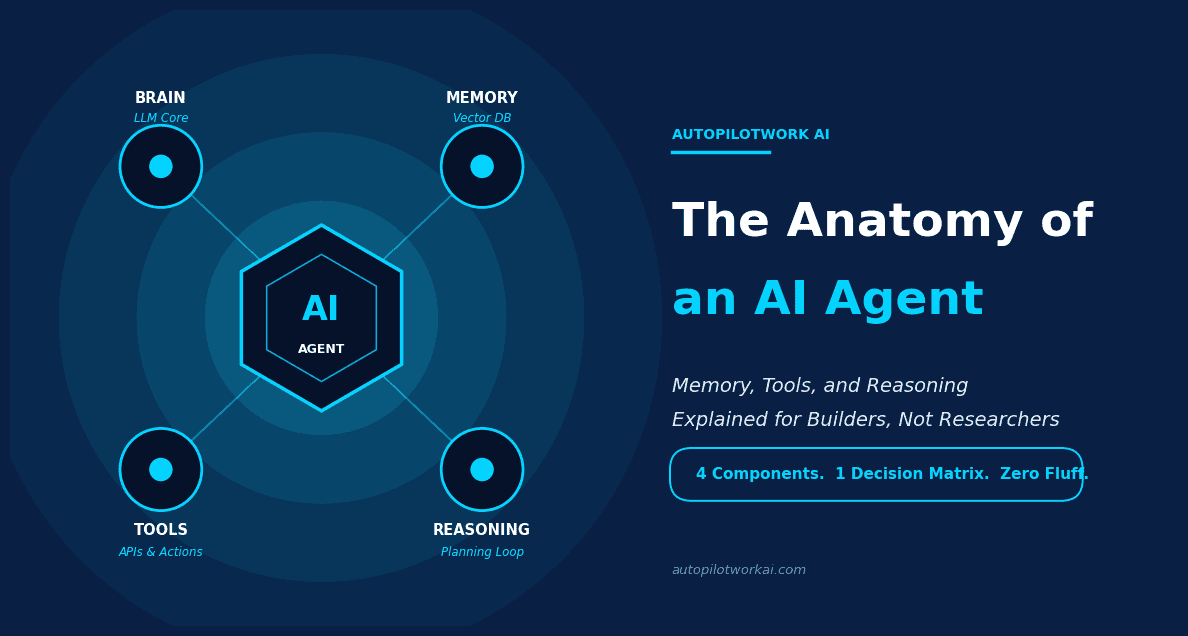
- The Brain — a large language model (LLM) that interprets goals and decides what to say or do.
- Memory — storage that persists information across messages, sessions, or tasks.
- Tools — connectors that let the agent take real actions in the world.
- Reasoning Loop — the orchestration logic that plans, executes, and self-corrects.
Strip out any one of these and you collapse back into something simpler. Remove memory, you get a stateless chatbot. Remove tools, you get a fancier LLM playground. Remove the reasoning loop, you get a sequential script. Remove the brain… you have no agent at all.
The 4 Core Components of Every AI Agent
Before we go into each one in detail, here is the structural map. Every commercial agent on the market — from CrewAI to LangChain to Microsoft Copilot Studio — implements these four pieces. The labels and architectures differ. The components do not.
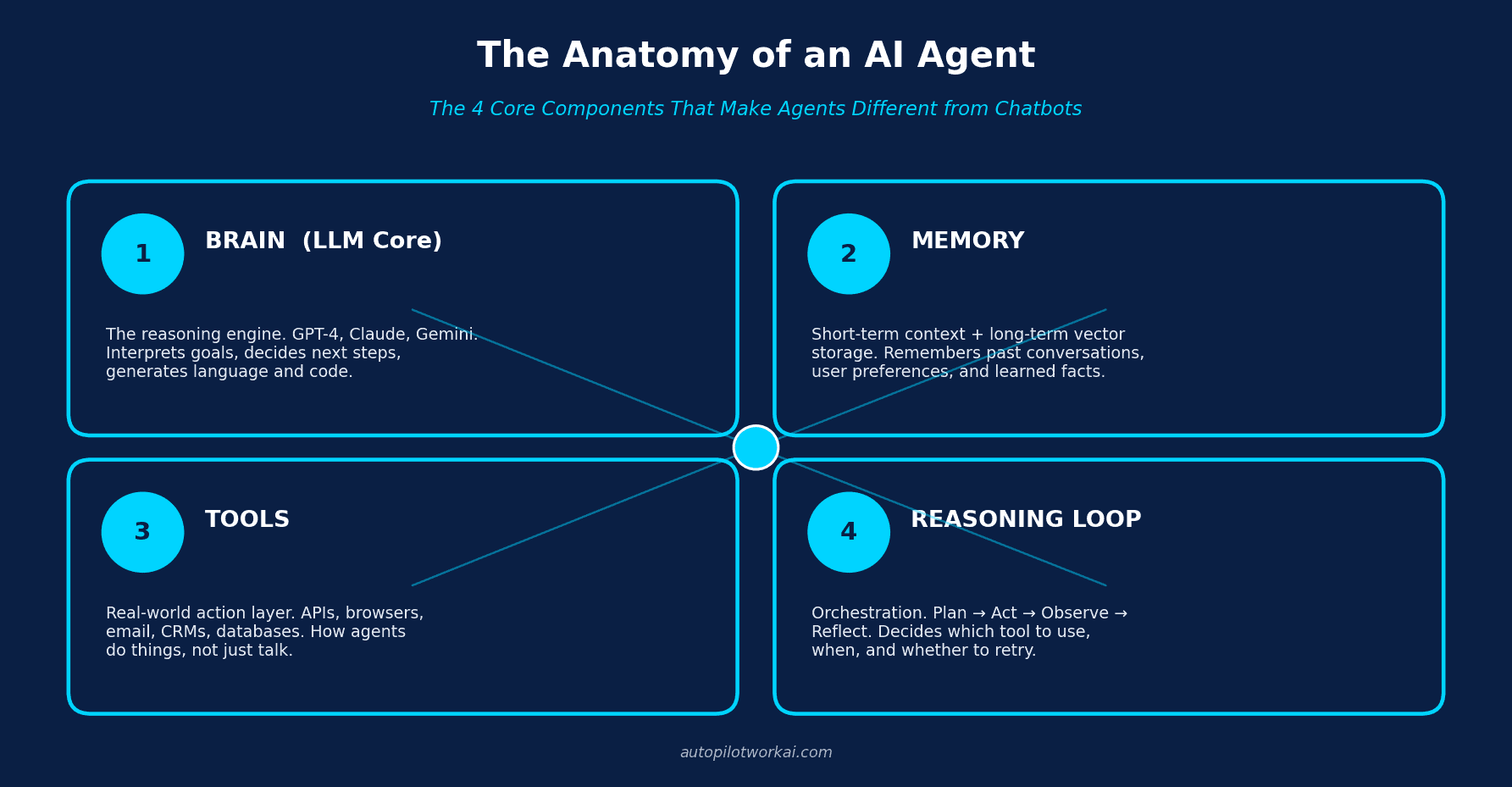
What makes this useful is not the diagram itself but what it reveals when you evaluate tools. When a vendor says “our AI agent does X,” you can now ask: which of the four components are you actually providing, and which am I expected to bring? The answer is usually telling. Many “agents” sold in 2026 are really just LLM wrappers with a tool connector bolted on, no real memory, and no autonomous reasoning loop.
Let’s go through each one.
Component 1 — The Brain: The LLM Core
The brain of every agent is a large language model. It interprets the goal you give it, decides what action to take, generates the text or code it needs, and produces the final response. This is the only component most non-technical buyers ever see directly.
The choice of LLM matters more than people think. Different models have different strengths: Claude tends to be the strongest reasoner for complex multi-step tasks, GPT-4o is fastest and has the broadest tool ecosystem, and Gemini has the deepest integration with Google Workspace. Our comparison of Claude vs ChatGPT vs Gemini for business use goes into specific benchmark results if you want to choose deliberately.
The brain has a critical limitation: it has no persistent memory of its own. Every time you call it, it sees only what’s in its context window — typically the current conversation plus whatever you stuff into the prompt. Forget for a moment that ChatGPT seems to “remember” you between sessions. That memory is not coming from the LLM itself. It is being injected back into the prompt by a separate memory layer. Which brings us to component two.
Component 2 — Memory: How Agents Remember
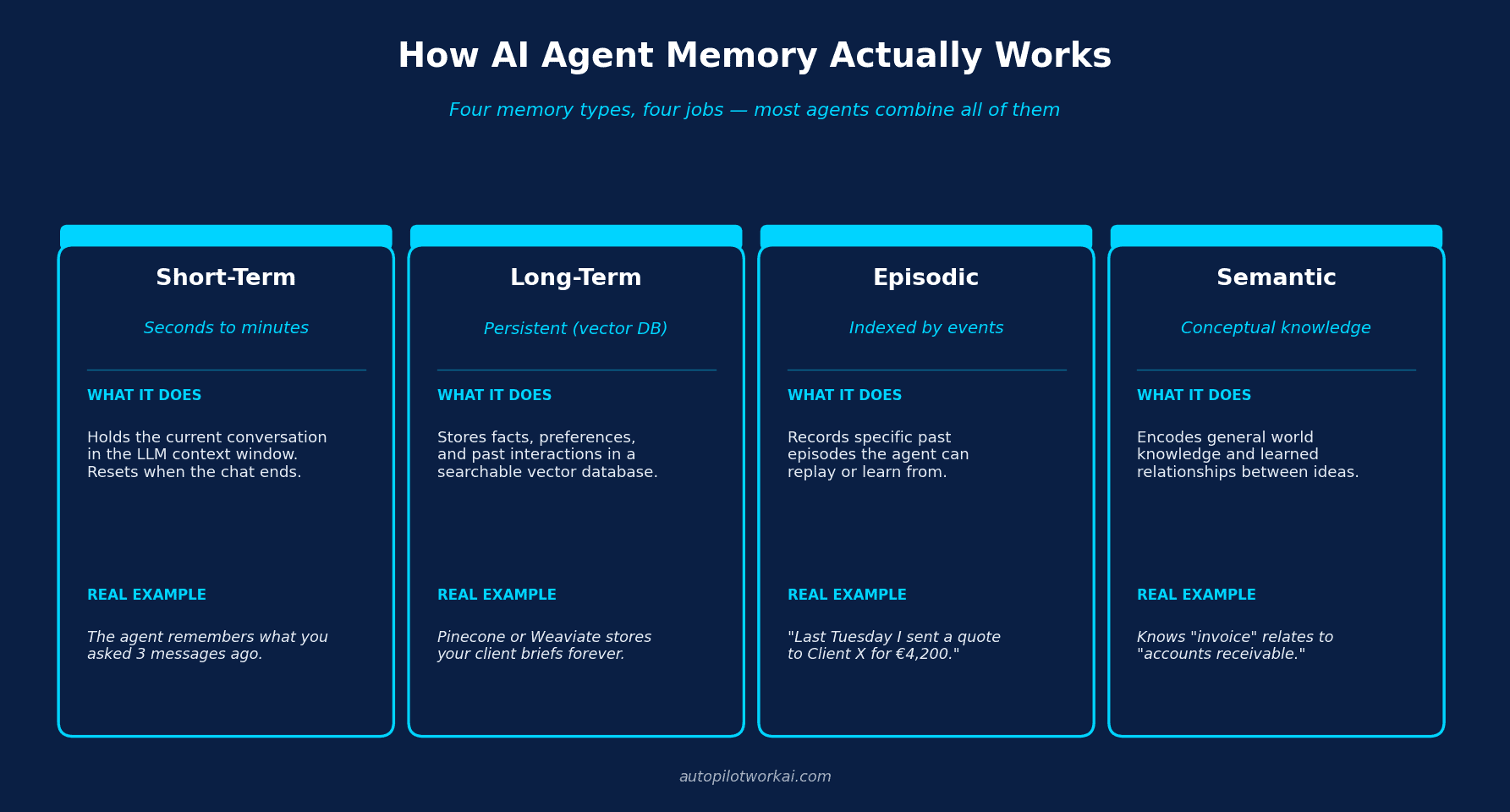
Memory is where most agent projects fail. Builders assume “the model remembers” and ship something that forgets every client preference the moment a new session starts. Real agents have explicit memory architectures, and there are four flavors you need to know.
Short-term memory
This is the conversation buffer. It sits inside the LLM’s context window and survives only as long as the session does. When you close the chat, it’s gone. Useful for one-task interactions. Useless for anything that needs continuity.
Long-term memory
This is where vector databases come in. Tools like Pinecone or Weaviate convert text into mathematical embeddings and store them indefinitely. When the agent needs to remember something from three weeks ago, it queries the vector store, retrieves the most relevant chunks, and injects them back into the prompt. This is called Retrieval-Augmented Generation (RAG), and it’s the backbone of nearly every serious agent in production.
Episodic memory
Episodic memory records specific past events the agent can replay. “Last Tuesday I sent a proposal to Client X for €4,200” is an episode. The agent stores not just the fact but the temporal context around it. This matters because episodic memory is what lets an agent learn from its own history — knowing that a particular email template got a response while another didn’t.
Semantic memory
Semantic memory is conceptual: it stores the relationships between ideas. The agent learns that “invoice” relates to “accounts receivable,” that “Acme Corp” is a “client” who pays in “EUR.” Knowledge graphs and structured ontologies live here. Most no-code platforms abstract this away, which is fine until you need to debug why your agent confused two clients with similar names.
The practical takeaway: when you evaluate an “AI agent” product, ask which memory types it supports. If the answer is “we use the model’s context window,” that’s only short-term memory. You’ll hit its limits inside a week.
Component 3 — Tools: How Agents Take Action
Tools are the action layer. They are the difference between an agent that talks about sending an email and one that actually sends it. In technical terms, a tool is any function or API the agent has been given permission to call.
Common tool categories include:
- Communication: Gmail, Outlook, Slack, WhatsApp Business
- Data: SQL databases, Google Sheets, Notion, Airtable
- Web: browsers, scrapers, search APIs
- Business systems: HubSpot, Salesforce, Stripe, Xero
- Files: Google Drive, Dropbox, S3
- Code: GitHub, code interpreters, shell execution
For non-developers, the easiest path into the tool layer is through orchestration platforms. Make.com and Zapier both expose thousands of pre-built tool connectors that an LLM can call via webhook or native AI module. You write the trigger and the action; the agent handles the decision of when and how to use them. We documented real AI agent use cases for solopreneurs using exactly this stack.
The trap with tools is permission scope. Every tool you grant the agent is a new attack surface and a new opportunity for the agent to do something expensive at 3 AM. Production-grade agents implement a permissions layer (read-only by default, human-in-the-loop for write actions, hard spending caps for paid APIs). If your platform doesn’t support this, it isn’t production-grade — it’s a demo.
Component 4 — Reasoning: The Orchestration Loop
The reasoning loop is the heart of the whole system. It’s what separates a script from an agent. A script executes a fixed sequence; an agent decides the sequence as it goes.
The canonical pattern is called ReAct (Reasoning + Acting), introduced in a 2022 Google research paper that remains the dominant architecture in 2026. The loop looks like this:
- Plan — the LLM interprets the goal and decides what to do first.
- Act — it calls a tool with specific inputs.
- Observe — it reads the tool’s output.
- Reflect — it decides whether the goal is achieved, whether to retry with different inputs, or whether to move to the next sub-step.
- Repeat — until the goal is met or a stop condition is hit.
This loop is what makes agents feel autonomous. It’s also what makes them expensive: every iteration is a fresh LLM call. A poorly designed loop can burn through €30 of API credits to send one email. Good agent platforms cap loop iterations, log every step, and let you replay them. If you want to see how the loop is implemented in practice, our walkthrough on how to build your first no-code AI agent in 30 minutes shows the entire flow inside a visual builder.
The reasoning loop is also where most open-source agent frameworks compete. Projects like open-source agents like AutoGPT, BabyAGI, and AgentGPT are essentially different opinions on how the loop should work — how aggressive the planning should be, how much self-criticism happens between steps, how much human oversight is required.
Build vs Buy: Which Components You Actually Need
Now that you can name the four parts, the question becomes: which ones should you build, and which should you buy? The answer depends almost entirely on two variables — how complex your use case is, and how much budget you have.
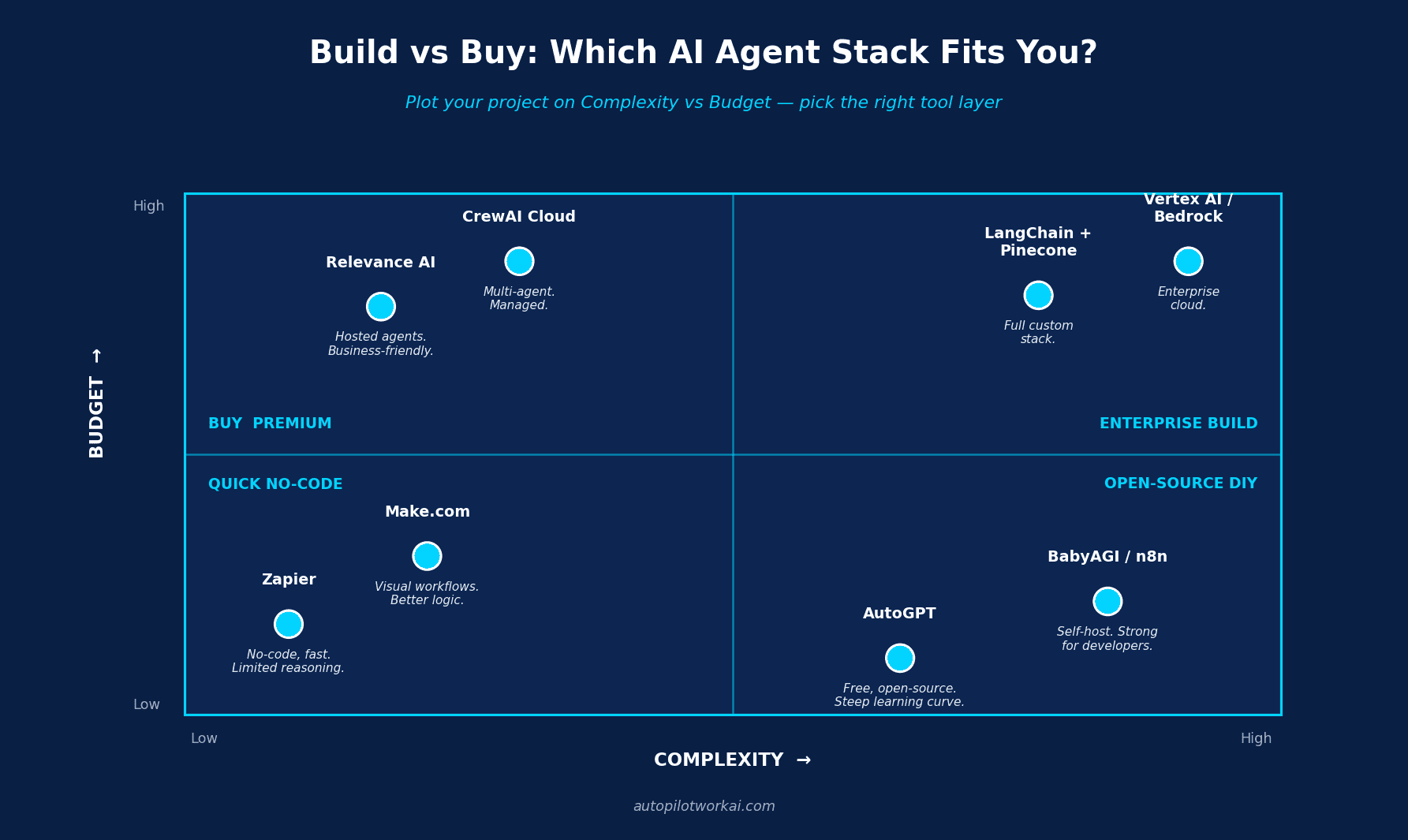
Here is how to read the matrix, with rough monthly cost expectations as of 2026:
| Quadrant | Best Stack | Typical Cost | Who It’s For |
|---|---|---|---|
| Quick No-Code | Zapier AI, Make.com, ChatGPT Custom GPTs | €20–€100/mo | Freelancers, simple automations |
| Buy Premium | Relevance AI, CrewAI Cloud, Lindy | €100–€500/mo | Agencies, multi-agent workflows |
| Open-Source DIY | AutoGPT, BabyAGI, n8n | €0–€50/mo + hosting | Devs, tinkerers, privacy-first teams |
| Enterprise Build | LangChain + Pinecone, Vertex AI, Bedrock | €500–€5,000+/mo | Engineering teams, compliance-heavy use cases |
A useful heuristic: start one quadrant cheaper than you think you need. Most agents I see in the wild are over-engineered. A solopreneur trying to automate client onboarding does not need LangChain and Pinecone. They need Make.com with a Claude module and a Google Sheets backend, and they need to ship it this week.
According to Gartner’s 2025 forecast, more than 40% of agentic AI projects will be canceled by the end of 2027 — largely due to escalating costs, unclear business value, and inadequate risk controls. Choosing the lightest stack that solves your actual problem is the single biggest predictor of whether your project survives.
Frequently Asked Questions
What is the difference between an AI agent and an LLM?
An LLM is just one of the four components inside an agent — the brain. An LLM alone can generate text but cannot remember past sessions, take real-world actions, or decide what to do next. An agent wraps an LLM with memory, tools, and a reasoning loop so it can pursue goals autonomously across multiple steps.
Do AI agents really have memory?
Yes, but not in the way humans do. AI agent memory is implemented as an external system — typically a vector database like Pinecone or Weaviate — that stores information as mathematical embeddings. When the agent needs to recall something, it searches this database and injects the relevant data back into the LLM’s prompt. The LLM itself does not actually “remember” anything between sessions.
What programming language do AI agents use?
You don’t need to know any language to use an AI agent. Platforms like Make.com, Zapier, and Relevance AI let you build production agents through visual interfaces. If you want to build from scratch with frameworks like LangChain or CrewAI, Python is the standard. JavaScript is also common for browser-based agents.
How much does it cost to run an AI agent?
Costs scale with usage. A simple no-code agent on Make.com can run for €20-€50 per month including LLM API calls. A multi-agent system on enterprise infrastructure can cost €1,000+ per month. The biggest hidden cost is the reasoning loop — poorly designed agents make redundant LLM calls and burn through API credits fast.
Can AI agents work without internet access?
Most commercial agents cannot, because they rely on cloud-hosted LLMs and SaaS tools. However, you can build a fully local agent using open-source LLMs (like Llama 3 or Mistral) running on your own hardware, with a local vector database and local tools. This is the path for privacy-sensitive use cases.
Is one AI agent enough or do I need multiple?
For most solopreneur use cases, one well-built agent is enough. Multi-agent systems become worthwhile when you have parallel workflows that benefit from specialization — for example, one agent doing research while another writes outreach emails. Frameworks like CrewAI exist specifically to coordinate multiple agents.
How is an AI agent different from RPA?
Robotic Process Automation (RPA) follows fixed, pre-recorded steps. If the interface changes, RPA breaks. An AI agent decides its steps at runtime based on the current situation, which means it can handle variability, unexpected inputs, and new scenarios without reprogramming. RPA is rule-based; agents are goal-based.
The Bottom Line
The word “agent” gets used so loosely it has almost stopped meaning anything. After reading this, it should mean something specific to you: a system with an LLM brain, an explicit memory layer, a tool layer that takes real actions, and a reasoning loop that decides what to do next.
When you evaluate any product calling itself an “AI agent” in 2026, hold it up against those four components. Ask which ones the vendor provides and which ones you’re expected to bring. Most “agent” products on the market today are missing at least one. That’s not necessarily bad — but you should know it before you buy.
If you’re ready to put this into practice, the fastest path is to pick a tiny, low-stakes use case (sorting inbound emails, drafting first-pass responses, qualifying leads) and ship a no-code version this week. Iterate from there. Reading another deep dive will not move you forward; building one half-broken agent will. To see how this is already playing out at scale, take a look at how AI agents are reshaping content workflows for creators and agencies in 2026.
The anatomy is now clear. What you build with it is up to you.