
Lindy AI Review: What I Learned After Building 10 Agents
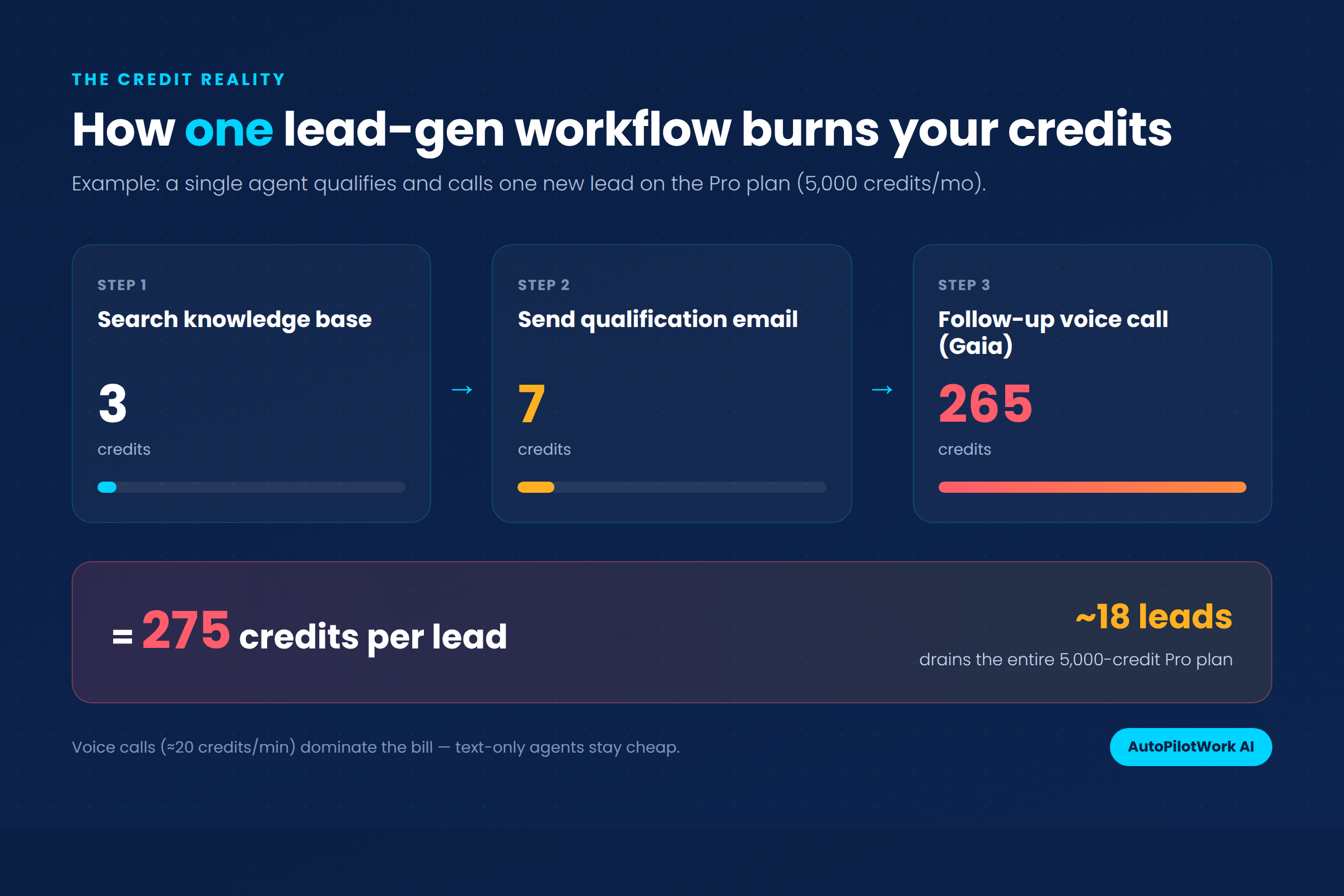
The first time I ran a single lead-generation agent in Lindy AI, it burned through 275 credits in under a minute. On the $49.99 Pro plan, that pace empties your entire monthly allowance in roughly 18 leads. That gap between the advertised sticker price and the real cost is exactly what most write-ups skip over. So I spent three weeks building 10 working agents to find out where the platform earns its keep and where it quietly drains your budget. This Lindy AI review is based entirely on that hands-on testing, not the marketing page.
TL;DR
- Lindy AI is excellent for scoped knowledge work like inbox triage and meeting prep, but its credit system makes high-frequency and voice tasks expensive fast.
- Pricing: a free plan with 400 credits, a Pro plan at $49.99/month for 5,000 credits, plus custom Business or Enterprise tiers. Credits do not roll over.
- Best feature: building agents in plain English. Worst trait: unpredictable credit burn plus weak debugging when an agent loops.
- Verdict: worth it for solopreneurs automating predictable knowledge work; risky if your jobs are voice-heavy or run at high volume.
What Is Lindy AI, and Who Is It Really For?
Lindy AI is a no-code platform for building AI agents (the company calls them “Lindies”) that can read context and complete multi-step tasks on your behalf. You describe what you want in plain language, and the platform assembles the workflow. A library of more than 100 templates covers the common jobs, so you rarely start from a blank screen.
This is the line that separates it from traditional automation. A classic “if this, then that” tool follows fixed rules. A Lindy agent can reason about an incoming email, decide whether it needs a reply, then draft one and pause for your approval before sending. If you are still deciding which model fits your situation, our breakdown of an AI agent versus a chatbot explains where each one belongs.
The sweet spot became obvious early in this Lindy AI review. Lindy suits solopreneurs, freelancers, and small teams who handle a lot of repetitive knowledge work and want a smart assistant rather than a rigid script. It is not built for developers chasing deep API control, and it is not the cheapest option if your needs are basic. For a sense of what is realistic to automate, our guide to AI agent use cases for solopreneurs pairs well with the findings below.
Lindy AI Pricing: What the Credit System Actually Costs
Pricing was the biggest surprise in this Lindy AI review, because half the sites online still list conflicting tier names and prices. As of this writing, Lindy runs a free plan with 400 monthly credits and a single standard paid plan, Pro, at $49.99 per month for 5,000 credits. Higher Business and Enterprise tiers exist with custom credit pools and security controls, but their pricing is reported inconsistently, so always confirm inside your own account.
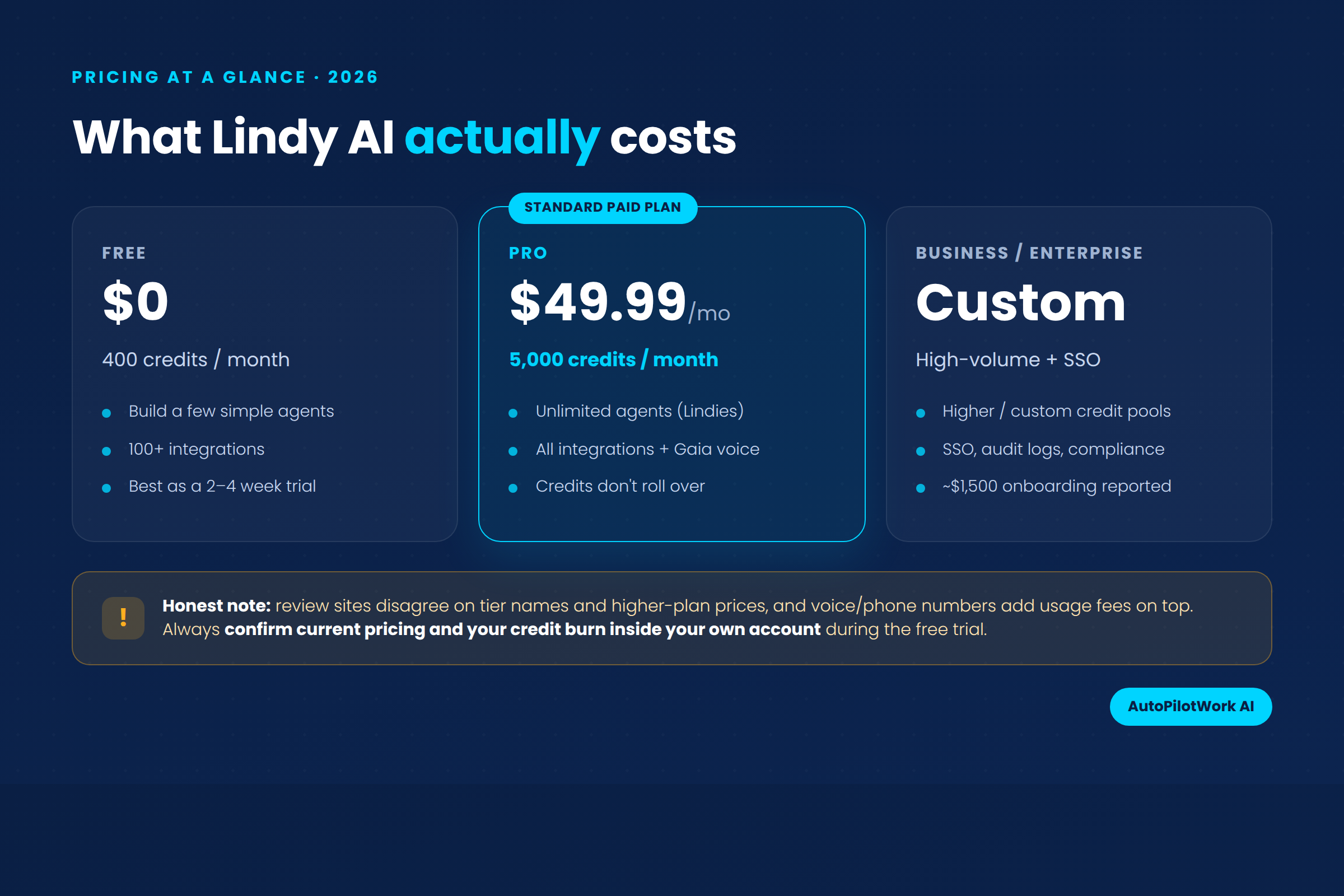
The sticker price is not the real number. Lindy bills by credits, and every action an agent takes draws from your pool. Simple tasks cost 1 to 3 credits on basic models, heavier model calls cost around 10, and voice calls run roughly 20 credits per minute on top of a $10 monthly fee per phone number. Credits do not carry over, so anything you do not use is gone at the reset.
Here is how a single workflow adds up in practice:
- Trigger fires and the agent starts (1 credit minimum).
- Knowledge base lookup to pull context (about 3 credits).
- Model call to reason and write, more if you pick an advanced model (often 7 to 10 credits).
- Premium action through an integration like a CRM, which can carry a multiplier.
- Voice minutes if the agent calls anyone, and this is where the meter spins fast.
For the official figures, check Lindy’s own site and the Lindy documentation before you commit, since the credit rates change.
The 10 Agents I Built: My Lindy AI Review Scorecard
Numbers only tell part of the story, so I built 10 real agents and graded each one on whether it earned its credits. This scorecard is the heart of my Lindy AI review.
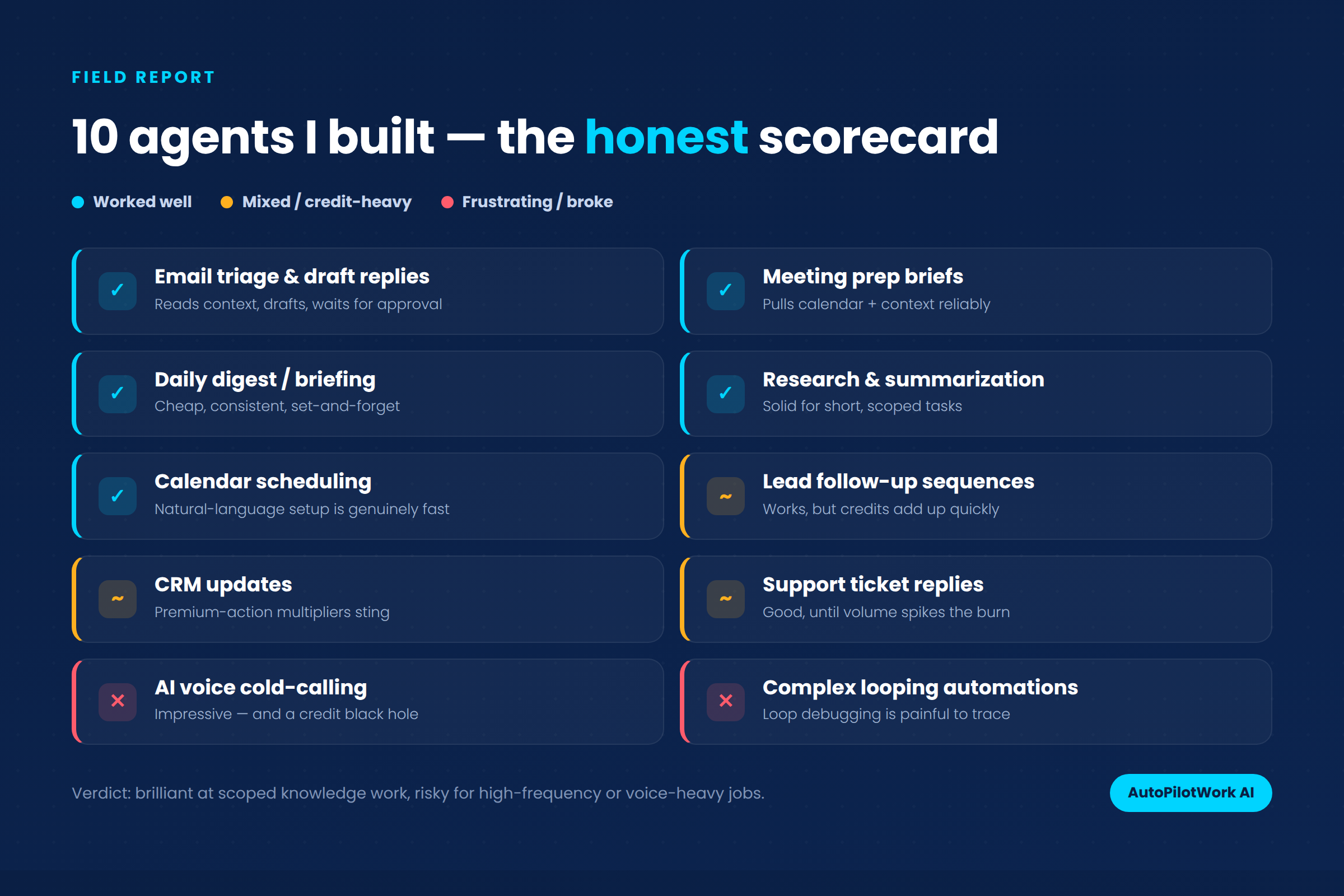
Five agents were clear wins. Email triage with draft replies was the standout: it read context, wrote a sensible response, then waited for my approval. Meeting prep briefs, a daily digest, research summaries, plus calendar scheduling all ran cheaply and reliably. These are the predictable, text-based jobs the platform was built for, and they are where most solopreneurs will get real value.
Three agents landed in the middle. Lead follow-up sequences, CRM updates, plus support ticket replies all worked, but the credits climbed quickly once volume rose or premium integrations got involved. Two agents frustrated me outright. AI voice cold-calling was technically impressive yet acted like a credit black hole, and a complex looping automation broke in a way that was genuinely hard to trace. If you want to try building something simpler first, our walkthrough on how to build an AI agent with no code is a gentler starting point than anything I attempted for this Lindy AI review.
Where Lindy AI Falls Short
No honest Lindy AI review skips the weak spots, and the credit model is the one this keeps coming back to. One visual makes the problem obvious. A single lead-generation workflow that searches your knowledge base, sends a qualification email, and places a follow-up call can hit 275 credits. At that rate, the Pro plan’s 5,000 credits vanish in around 18 leads.
Beyond cost, a few rough edges showed up during testing for this Lindy AI review. The platform leans heavily on the Google ecosystem, so you grant broad permissions early. There is a noticeable delay (around 20 seconds in my tests) before some tasks initialize. The trigger screen can feel overwhelming for a first-timer. And when an agent gets stuck in a loop, the debugging tools leave you guessing more than they should.
The voice agent deserves a fair word too, because the technology is strong. Lindy’s Gaia voice agent runs on Deepgram for low-latency speech, and the conversation quality is genuinely good. The catch is purely economic: every minute eats credits, so a feature that demos beautifully can wreck a budget at scale.
Lindy AI vs Zapier vs Make: Which Should You Pick?
For this Lindy AI review I also stacked Lindy against the two biggest automation names, since most people weighing it are looking at them too. They solve overlapping problems in different ways, so the right pick depends on whether you want reasoning, reach, or fine control.
| Factor | Lindy AI | Zapier | Make |
|---|---|---|---|
| Best for | Agents that reason and decide | Connecting the most apps | Visual, granular control |
| Pricing model | Credits per action | Tasks per workflow | Operations per run |
| Starting paid price | $49.99/mo | $19.99/mo | ~$9/mo |
| Native integrations | A few hundred | 8,000+ | 2,000+ |
| AI reasoning | Built in, strong | Add-on step | Add-on step |
| Voice agents | Yes (Gaia) | No native | No native |
If your priority is contextual decisions and you can live with the credit model, the verdict in this Lindy AI review is that Lindy wins. If you want the largest integration library at a lower entry price, the answer leans elsewhere. Our deeper comparison of Make versus Zapier for solopreneurs covers that decision in detail. And since Lindy shines brightest at inbox work, it is worth reading how to use Claude for email automation as a complementary approach.
Want to test the credit burn for yourself?
Start on the free 400-credit plan before you pay for anything.
Frequently Asked Questions
Is Lindy AI worth it?
For solopreneurs and small teams automating predictable knowledge work, yes. Tasks like scheduling and meeting prep run cheaply and reliably, and the time saved easily justifies $49.99 a month. It becomes a harder sell if your workflows are voice-heavy or high-volume, because the credit model turns a flat subscription into a variable bill. This Lindy AI review found the free plan to be the best way to gauge fit, so test it and watch your burn rate before upgrading.
How much does Lindy AI cost?
Lindy offers a free plan with 400 credits per month and a Pro plan at $49.99 per month for 5,000 credits. Business and Enterprise tiers add higher credit pools and security features at custom prices. On top of that, voice calls cost roughly 20 credits per minute and each phone number adds about $10 monthly, so the real total depends heavily on how you use it.
Do Lindy AI credits roll over?
No. Unused credits expire at the end of each billing cycle and do not carry into the next month. When you run out, your agents pause until the cycle resets or you buy more. This is one of the most important things to plan around, since light months effectively waste credits while heavy months can leave agents stalled at the worst possible time.
Is Lindy AI better than Zapier?
They are built for different jobs. Lindy is stronger when you need an agent that reasons and makes decisions. Zapier is stronger when you need to connect a huge number of apps with predictable, rule-based steps at a lower price. Many operators end up using both: Zapier for plumbing between tools and Lindy for the tasks that genuinely need judgment.
Can Lindy AI make phone calls?
Yes. Its Gaia voice agent can place and receive calls with low-latency, natural-sounding speech, which is impressive in testing. The trade-off is cost. Voice runs around 20 credits per minute plus a monthly phone-number fee, so it drains a credit balance far faster than text tasks. Treat voice as a premium feature you budget for deliberately rather than a default.
Is Lindy AI good for non-developers?
Very much so. You build agents by describing them in plain English, and the template library handles most common use cases out of the box. Throughout this Lindy AI review the no-code builder felt approachable, with only a short learning curve around the trigger screen and how credits are consumed. No coding is required, and anyone comfortable with basic automation logic can be productive within an afternoon.
The Bottom Line: My Lindy AI Review Verdict
After three weeks and 10 agents, my honest verdict is that Lindy AI is one of the best ways for a non-developer to put real AI agents to work, with a single important caveat. The platform itself is a genuine bargain for what it does with scoped, text-based knowledge work. The credit system is what introduces risk, turning a tidy $49.99 subscription into a cost that scales unpredictably the moment voice or high-frequency tasks enter the picture.
So here is the practical close to this Lindy AI review. Start free, build two or three agents around your inbox and calendar, and watch your credit burn for a couple of weeks before you upgrade. If there is one takeaway from this Lindy AI review, it is that predictable work makes Lindy well worth the price, while voice-heavy or high-volume work needs careful budgeting or a cheaper automation layer for the simple steps. Either way, you now know where the money actually goes.