

TL;DR — Top AI Agent Use Cases for Solopreneurs
-
- Biggest wins (top 3): Email triage (5.5h/wk), lead qualification (4h/wk), content research (3.5h/wk) — these alone reclaim 13 hours weekly.
-
- Total potential savings: 22+ hours per week — equivalent to a half-time virtual assistant at roughly 5% of the cost.
-
- Start with one, not ten. Pick your single biggest time sink, deploy that agent, validate it for 30 days, then add the next.
-
- Typical monthly cost: $50-200 for a 3-5 agent stack — versus $3,000-5,000/month for a part-time human VA covering the same tasks.
-
- The 80/20 toolset: Most AI agent use cases for solopreneurs are built on Zapier or Make.com with Claude or GPT as the reasoning layer. No coding required.
Affiliate Disclosure: This article contains affiliate links. If you purchase through these links, AutoPilotWork AI may earn a commission at no extra cost to you. Every tool recommended here has been personally tested in real-world workflows.
Why AI Agent Use Cases for Solopreneurs Are Different from Enterprise Use Cases
Before walking through the use cases, it’s worth being precise about terminology. An AI agent is software that takes a goal, plans a sequence of actions, executes those actions across tools and APIs, and decides whether to continue or stop based on the result. This is fundamentally different from a chatbot that responds to one prompt at a time. We’ve covered this distinction in detail in our breakdown of AI agents vs chatbots vs automation — the short version is that agents are goal-driven and iterative, while chatbots and simple automations are reactive and linear. What makes AI agent use cases for solopreneurs distinct from enterprise deployments is scope and budget. A solopreneur isn’t building a multi-million-dollar customer service agent — they’re building a single-purpose worker that handles one specific recurring task and costs under $100/month to run. Most “AI agents” in practice today are hybrid systems: a no-code automation platform like Zapier or Make handles the trigger and tool integration, while an LLM (Claude or GPT) does the reasoning, drafting, classification, or decision-making. That’s the architecture behind every use case below, and it’s why none of them require coding skills.Where AI Agent Use Cases for Solopreneurs Deliver the Biggest Time Savings
The chart below ranks all 10 use cases by typical hours saved per week for a solopreneur running a service business or content operation with a normal client load. Numbers represent realistic mid-range outcomes — not best-case marketing claims, not worst-case dabbler attempts.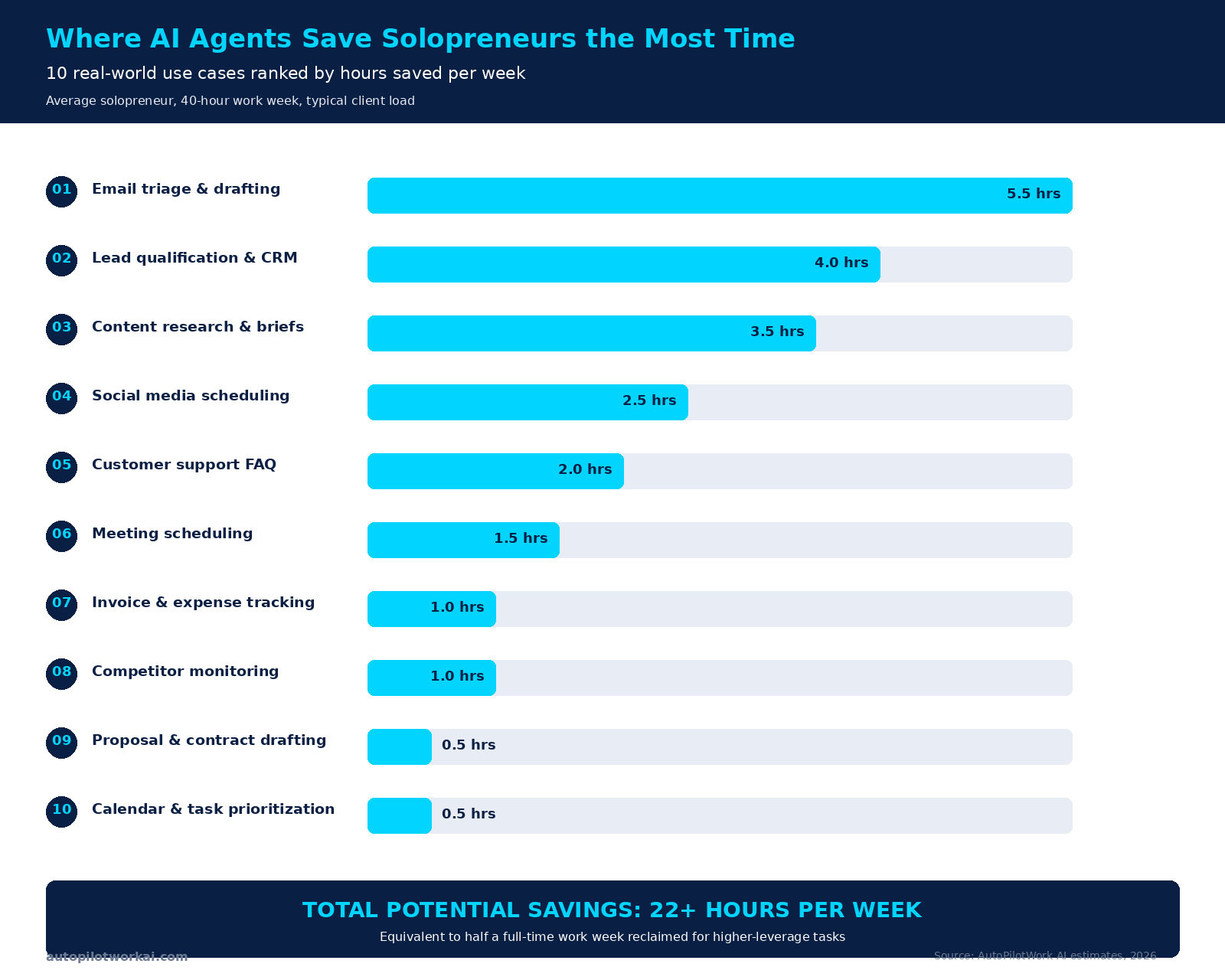
The 10 AI Agent Use Cases for Solopreneurs: Tools, Setup, and ROI
Each use case below follows the same format: what the agent does, the typical stack required, setup time, monthly cost, and how many hours per week it realistically reclaims.1. Email Triage and Reply Drafting (Saves 5.5 hours/week)
The single highest-leverage use case for almost every solopreneur. An email agent monitors your inbox, classifies incoming messages by intent (sales inquiry, support, newsletter, transactional), and drafts contextual replies in your tone for the messages that actually need a response. You review and send. Newsletters and transactional emails get auto-archived or labeled.-
- Stack: Gmail or Outlook + Zapier + Claude API
-
- Setup time: 30-60 minutes
-
- Monthly cost: $30-80 (Zapier Starter + Claude API at typical volumes)
-
- Time saved: 5.5 hours per week for a solopreneur receiving 50-150 emails daily
2. Lead Qualification and CRM Updates (Saves 4 hours/week)
Every solopreneur with a contact form, landing page, or inbound channel knows the pain of manually qualifying leads — reading each submission, deciding if the prospect fits your ICP, looking up their LinkedIn or website, and updating a CRM entry. An AI agent does this end-to-end: enriches the lead with public data, scores fit against your criteria, drafts the first-touch reply, and creates a CRM record with a clear next action.-
- Stack: Contact form (Typeform, Tally) + Zapier + Claude or GPT + CRM (HubSpot Free, Pipedrive, or Notion)
-
- Setup time: 2-3 hours
-
- Monthly cost: $40-100
-
- Time saved: 4 hours per week for solopreneurs receiving 20-100 inbound leads weekly
3. Content Research and Brief Generation (Saves 3.5 hours/week)
For content-driven solopreneurs — bloggers, course creators, consultants who publish regularly — research is the unsung time sink. An agent automates the upstream work: pulls top 10 search results for a target keyword, extracts key arguments, identifies content gaps, and produces a structured brief with target word count, suggested H2s, and angles competitors missed. You start writing from a 70%-complete outline instead of a blank page.-
- Stack: Perplexity API or Brave Search + Claude + Notion or Google Docs
-
- Setup time: 1-2 hours
-
- Monthly cost: $40-120
-
- Time saved: 3.5 hours per week for someone publishing 2-4 long-form pieces monthly
4. Social Media Scheduling and Repurposing (Saves 2.5 hours/week)
Manually adapting a single blog post into LinkedIn carousel, Twitter thread, Instagram caption, and YouTube short description is death by paper cuts. An agent takes one source piece (blog, podcast transcript, newsletter) and outputs platform-native variants in your voice, schedules them across the week, and avoids the cliché AI tone that gets ignored.-
- Stack: Buffer or Hypefury + Claude or GPT-4o + Make.com or Zapier
-
- Setup time: 1-2 hours
-
- Monthly cost: $35-90
-
- Time saved: 2.5 hours per week for someone posting daily across 3+ platforms
5. Customer Support and FAQ Handling (Saves 2 hours/week)
If you sell digital products, courses, software, or services, you’re answering the same 15 questions every week. A support agent sits on your website or in your help inbox, trained on your documentation and past tickets, and answers 60-80% of incoming questions autonomously. The remaining 20-40% — actual edge cases — get escalated to you with context attached so you can respond faster.-
- Stack: Tidio, Chatbase, or Intercom Fin + your help docs
-
- Setup time: 2-4 hours (most of it organizing your docs)
-
- Monthly cost: $20-100 depending on platform
-
- Time saved: 2 hours per week for product/SaaS solopreneurs
6. Meeting Scheduling and Follow-Ups (Saves 1.5 hours/week)
The classic “send me three times that work” email chain is fully solvable. A scheduling agent integrates with your calendar, proposes times based on actual availability and prep buffers, handles timezone math, books the meeting, sends prep materials beforehand, and produces follow-up notes afterward. For consultants and coaches running 10+ calls per week, this compounds.-
- Stack: Calendly or Cal.com + Zapier + Claude (for the follow-up summary step)
-
- Setup time: 30-60 minutes
-
- Monthly cost: $20-50
-
- Time saved: 1.5 hours per week for solopreneurs running 10+ external meetings weekly
7. Invoice Generation and Expense Tracking (Saves 1 hour/week)
End-of-month invoicing, expense categorization, and chasing late payments all follow predictable patterns. An agent pulls completed tasks from your project tracker, generates invoices, sends them with a polite reminder schedule, categorizes incoming expenses for tax purposes, and flags anomalies. Not the most exciting use case — but compounds beautifully across years.-
- Stack: Stripe + accounting tool (Wave, FreshBooks, Xero) + Zapier
-
- Setup time: 2-3 hours
-
- Monthly cost: $25-80
-
- Time saved: 1 hour per week for service businesses with 5+ active clients
8. Competitor and Market Monitoring (Saves 1 hour/week)
Knowing what your top 5 competitors are publishing, pricing, and launching used to require manual checks every Monday morning. An agent scrapes target pages weekly, detects changes (pricing updates, new product pages, blog posts, hiring announcements), and delivers a one-page digest every Monday at 8am. You read for 5 minutes instead of researching for 60.-
- Stack: Visualping or Browse AI + Claude (for summarization) + Notion or email
-
- Setup time: 1-2 hours
-
- Monthly cost: $30-70
-
- Time saved: 1 hour per week, but the strategic value is often worth more than the time alone
9. Proposal and Contract Drafting (Saves 0.5 hours/week)
Every solopreneur consultant or agency owner has a library of past proposals they cobble together for each new client. An agent takes the scoping call transcript, identifies project requirements, pulls relevant case studies from your library, and generates a polished first-draft proposal in your template. You spend 20 minutes editing instead of 2 hours assembling.-
- Stack: Otter.ai or Fireflies (for transcripts) + Claude + your proposal template in Notion or Google Docs
-
- Setup time: 2-3 hours
-
- Monthly cost: $40-100
-
- Time saved: 0.5 hours per week on average — but 3-5 hours per new client proposal, which compounds for active sales pipelines
10. Calendar and Task Prioritization (Saves 0.5 hours/week)
The smallest measurable time saving — but a meaningful psychological one. An agent reviews your calendar and task list each morning, identifies what actually moves the needle versus what’s busywork, and produces a prioritized list for the day. Cuts decision fatigue and the “what should I work on next?” loop that eats 5 minutes here, 10 minutes there, throughout the day.-
- Stack: Google Calendar + your task manager (Todoist, Notion, Linear) + Claude
-
- Setup time: 1 hour
-
- Monthly cost: $20-40
-
- Time saved: 0.5 hours per week directly, with secondary benefits in focus and task completion
How to Pick the Right AI Agent Use Cases for Solopreneurs to Start With
The matrix below plots all 10 AI agent use cases for solopreneurs by setup effort versus weekly ROI. The decision rule is simple: start in the green quadrant, validate for 30 days, then expand to the blue quadrant. Avoid the red quadrant until you have at least 3-4 working agents in your stack.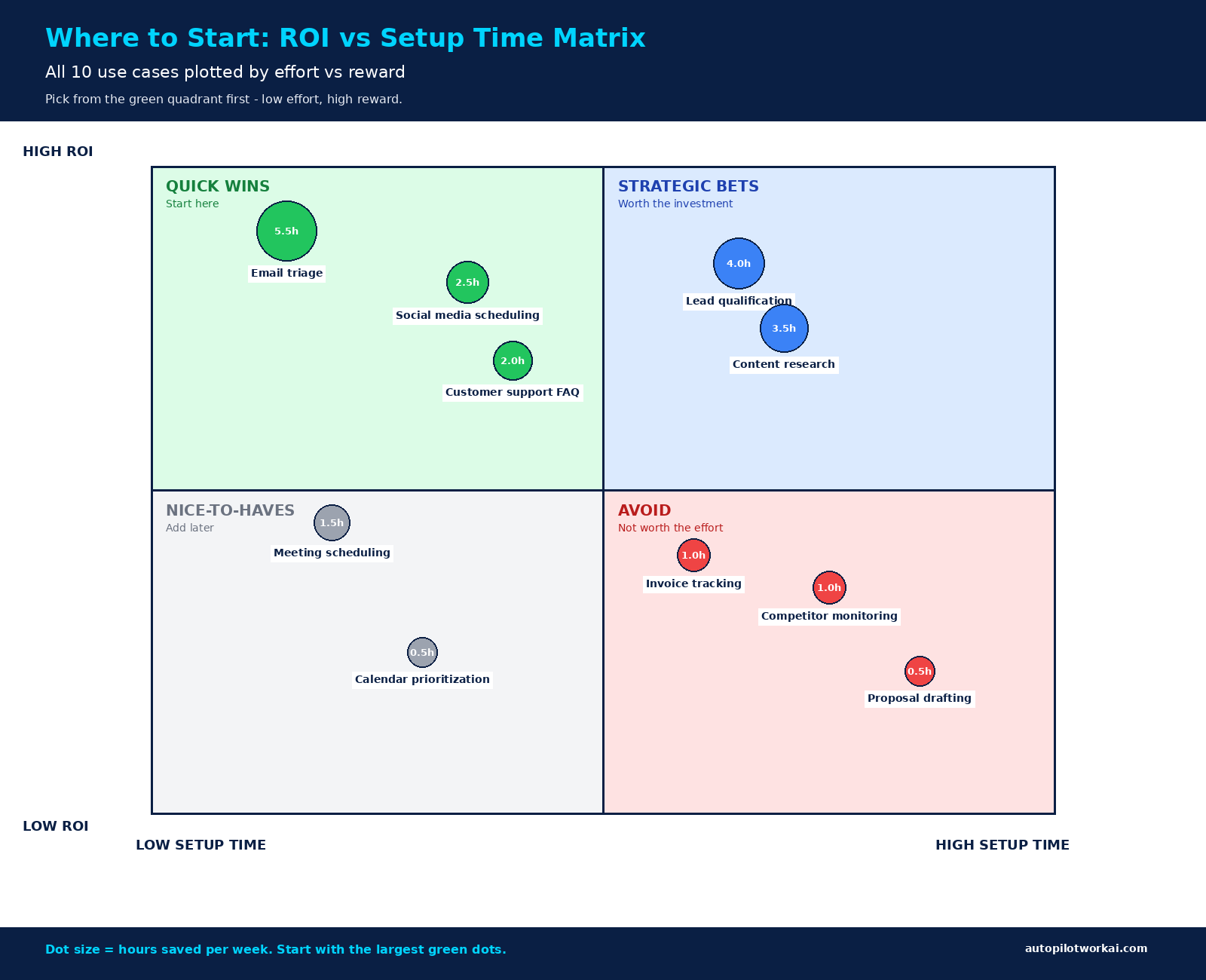
Building Your Solopreneur AI Agent Stack
The 10 use cases above aren’t meant to be deployed all at once. The most successful solopreneur stacks evolve gradually — one agent per month, validated against real time savings, then expanded. Within 6 months, a focused operator can have 5-6 agents handling 40-50% of operational work, leaving the remainder for high-leverage strategic tasks.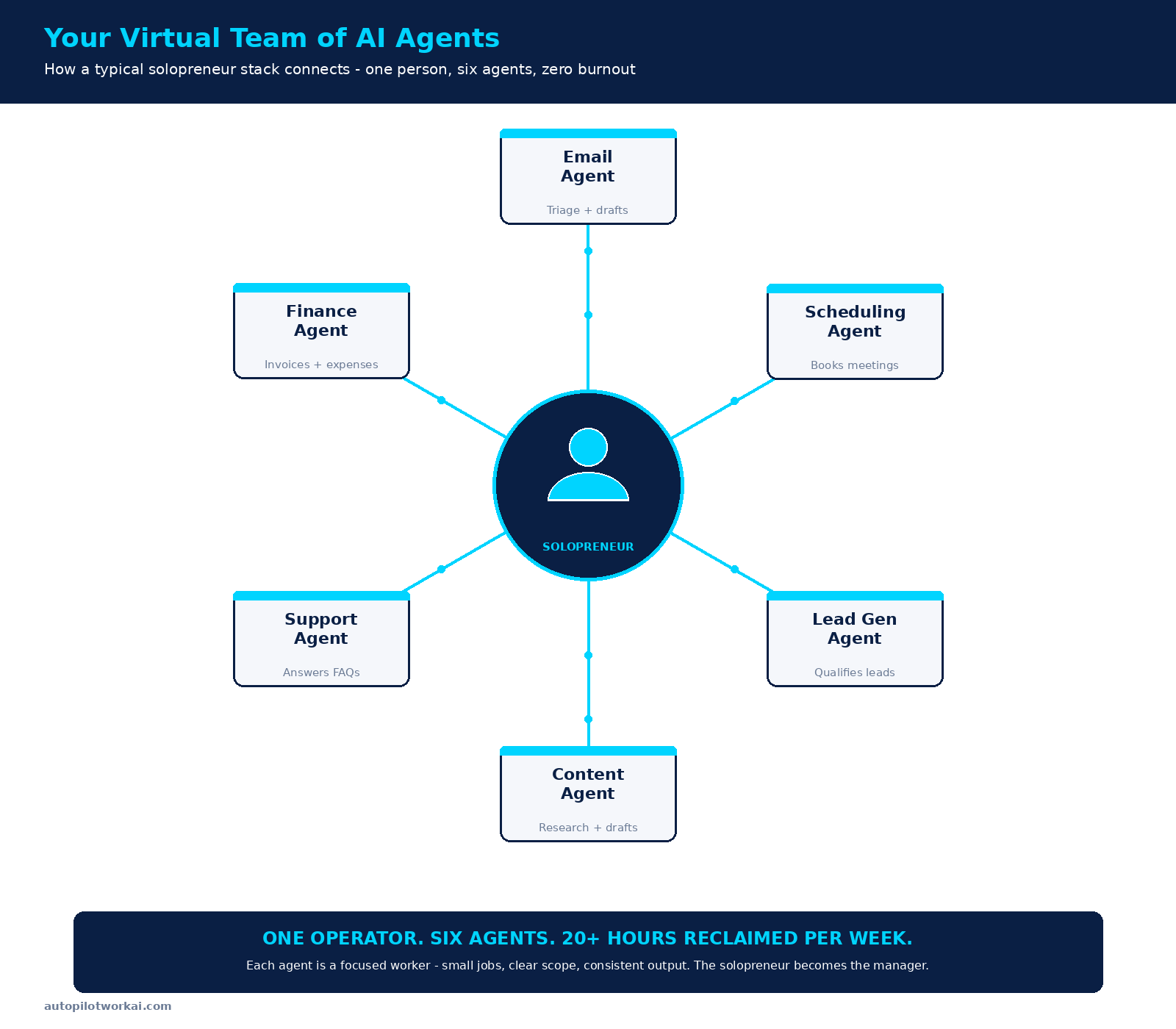
Five Mistakes Solopreneurs Make Deploying AI Agents
Most failed agent deployments fail in predictable ways. Avoiding these saves the painful month-three rebuild.-
- Building 5 agents at once. Each agent has setup, monitoring, and edge-case maintenance. Five simultaneous deployments means five debugging fronts and zero working agents at the end of month one. Build one, validate, then add the next.
-
- Skipping the baseline measurement. Without timing the manual task for a week before deploying the agent, you can’t tell whether you actually saved time or just shifted it to maintenance. Use a simple time-tracking app for the first 7 days.
-
- Auto-sending without review. Agents hallucinate. A single bad auto-sent email to a key client can undo months of relationship building. Stay in draft-and-review mode for at least 60 days per agent.
-
- Vague agent scope. “Handle my email” fails. “Draft replies to client questions about project timelines and flag everything else for me” works. Tight scope means reliable behavior.
-
- No error handling or escalation path. APIs fail, rate limits hit, LLMs return empty responses. Every agent needs a fallback — either retry logic, a human escalation, or a clean failure mode. Without it, you’ll discover problems only when a client complains.
Frequently Asked Questions About AI Agent Use Cases for Solopreneurs
Do I need coding skills to deploy these AI agent use cases?
No. All 10 AI agent use cases for solopreneurs covered above can be implemented with no-code automation platforms (Zapier, Make.com, n8n) combined with an LLM API (Claude or GPT). Setup involves drag-and-drop workflow building, API key configuration, and prompt writing — no programming. Solopreneurs comfortable with Google Workspace or Notion can build these agents in under three hours each.What’s the typical monthly cost for a solopreneur AI agent stack?
Most solopreneur stacks running 3-5 agents cost $50-200/month total. This includes the automation platform ($20-50), the LLM API ($10-80 depending on volume), and any specialized tools per use case ($20-70). Compare this to $3,000-5,000/month for a part-time human virtual assistant covering the same task surface area — the ROI is roughly 30-50x.Which AI agent use case should I start with first?
Whichever currently eats the most of your time. For most solopreneurs that’s email triage — it’s the single highest-ROI use case and has the cleanest setup path. If email isn’t your bottleneck, look at the green quadrant of the matrix above and pick whichever maps most directly to a daily pain point you actually feel. Avoid starting with use cases from the red quadrant regardless of how interesting they sound.How long until an AI agent actually starts saving time?
Expect 2-4 weeks before a deployed agent reliably saves more time than it costs to maintain. The first week is setup and edge-case discovery. The second week is prompt refinement. By week three, most agents stabilize. Past month one, time savings compound — but the first month rarely shows net positive ROI. Set expectations accordingly.Can AI agents handle tasks involving sensitive client data?
Yes, with caveats. Anthropic and OpenAI’s commercial APIs don’t train on data submitted through them — this is a contractual guarantee. For most solopreneur use cases (general business email, content, scheduling), this is sufficient. For regulated data (HIPAA, EU GDPR-sensitive personal data, attorney-client privileged information), review the provider’s data processing addendum carefully and consider self-hosted LLM alternatives or platforms that offer explicit Business Associate Agreements.What’s the difference between AI agents and AI tools like ChatGPT?
An AI tool like ChatGPT responds to one prompt at a time — you ask, it answers. An AI agent operates on a goal: it plans multiple steps, executes them across tools and APIs, evaluates results, and continues or adjusts based on outcomes. The AI agent use cases for solopreneurs covered in this guide are all agent-based — they run autonomously in the background while you do other work, not as one-off prompt-response interactions.What happens when an AI agent makes a mistake?
It depends on the agent’s autonomy level. For draft-and-review agents (the recommended starting point), mistakes appear as bad drafts you simply don’t use — low risk, easy recovery. For auto-execute agents (auto-send email, auto-book meetings), a mistake can cause real damage to client relationships or business operations. This is why the standard recommendation is to keep agents in draft mode for the first 60 days and only graduate specific narrow tasks to full autonomy once error rates are verified at zero.The Bottom Line on AI Agent Use Cases for Solopreneurs
The 20+ hours per week claim is real, but it’s earned across 6-12 months of disciplined buildout — not the result of a single weekend’s enthusiasm. Pick one use case from the green quadrant of the matrix above. Build it this weekend. Validate it for 30 days. Then add the next. Repeat for six months and you’ll have a virtual team of focused agents handling the operational drag that used to consume half your work week. The mistake to avoid is treating AI agent use cases for solopreneurs as a magical productivity boost rather than what they actually are: focused workers with narrow scopes that compound across years. The solopreneur who deploys one agent monthly for 12 months will dramatically outperform the solopreneur who tries to automate everything in a single month and burns out at month two. Which use case eats the most of your time right now? Drop it in the comments and I’ll suggest the fastest path to recovering those hours.About the Author: Emmanouil Mavratzotis is the founder of AutoPilotWork AI. He helps freelancers, solopreneurs, and agency owners save time and scale their business through AI tools and workflow automation. Every recommendation on this site comes from real-world testing and practical implementation.